How A2X Handles Accounts and Taxes Mapping
Written by: Amy Crooymans
May 29, 2026 • 9 min read
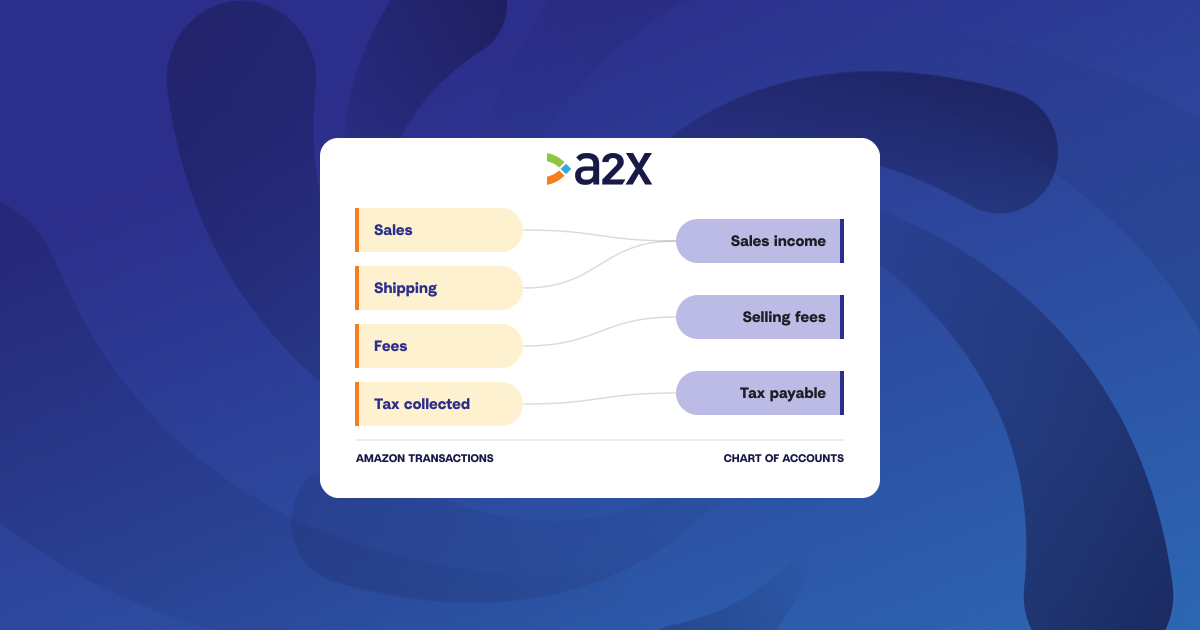
Accounts and taxes mapping is the configuration that decides how cleanly your books reconcile and how accurate your P&L is. It’s the main part of your setup in A2X, mapping every transaction type, sales, refunds, taxes, fees, and so on, to the right general ledger account and with the correct tax rate.
Set it up once, and every payout reconciles perfectly with one click. It’s the foundation for accurate, automated ecommerce accounting.
A2X is built so most businesses get there in a few clicks with Assisted Setup. Finance teams and accounting firms that need more, like their own chart of accounts, granular tax treatment, or client-by-client control, get it on the same page, without rebuilding anything. This guide explains both setup options, key features of the A2X mapping page, and how A2X handles tax by region.
Key takeaways
- Your mapping builds your ecommerce financials: every sale, fee, refund, and tax line lands in an income, expense, or liability account (and so on) during this step, so your revenue and margin are only as accurate as the mapping.
- Assisted Setup gets most businesses up and running in minutes: answer three questions, and A2X presets the whole mapping page, so you’re posting in a few clicks.
- Custom Setup gives finance teams and accounting firms full control: map to your own chart of accounts standard and apply it across every client.
- A2X handles tax granularly and by region: sales, shipping, refunds, promotions, and marketplace facilitator tax each map separately, with automatic tax-liability tracking for the US and Canada and mirror mapping for VAT and GST countries.
- A safety net flags problems before anything posts: unmapped rows in yellow, account or tax-rate mismatches in red, and auto-mapping rules that catch new transaction types.
Why mapping accuracy matters
Every line you map lands in an income or expense account, so the mapping is what gives your P&L its shape.
Often, the errors that matter most are the ones that don’t show on the surface: tax booked as income, fees netted against sales, refunds that never reverse. The P&L looks fine until someone reconciles the detail, usually at year-end or in diligence, and by then it’s costly to unwind. A2X handles the mapping correctly by default, so the numbers are right before anyone has to go looking.
Setting up the mapping page
The page has two setup paths, plus a safety net that catches problems before they post: take the few-click route, or take full manual control. The defaults come from years of input from accounting firms in the A2X Ecommerce Accountant Directory, and the page processes tens of millions of orders a month across more than 13,000 ecommerce businesses.
Assisted Setup: working mappings in a few clicks
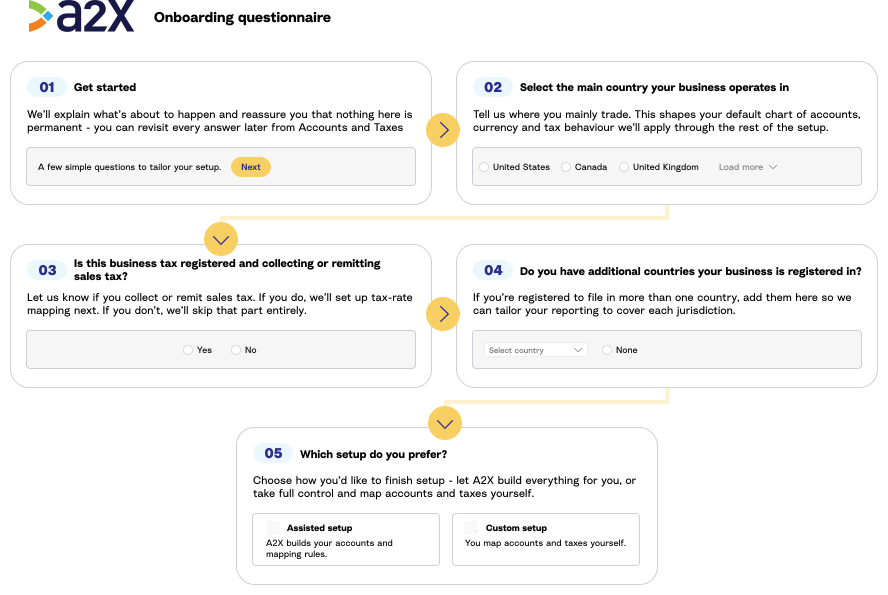
Assisted Setup is the default onboarding flow, and the right choice for most businesses and for accountants who don’t yet have a standard chart of accounts to apply. On the mapping page, A2X asks three questions:
- Where the business is based.
- Whether it’s tax-registered there.
- Whether it’s registered in more than one country.
From those answers, Assisted Setup presets the entire mapping page: creates an ecommerce-specific Chart of Accounts in your accounting software, maps every transaction type A2X has detected to the right account, and applies the right tax rates for your registration setup. You’re posting to Xero, QuickBooks Online, NetSuite, or Sage in minutes.
A2X recommends having an accountant or bookkeeper check the setup before posting live. Free onboarding support is included on every plan if you’d rather walk through it with someone.
Custom Setup: full control for firms with their own GL standard
Custom Setup gives a blank mapping page and full control over every account and tax rate. It’s the default for accountants and bookkeepers who maintain a standardized chart of accounts across clients and don’t want A2X auto-creating accounts.
It’s used in two ways:
- From the start, if the firm has a preferred GL structure and wants every client mapped to it.
- As an override on top of Assisted Setup. Many users will start with Assisted Setup as a template, then edit from there. If a client has their own Shopify Fees account, add that one row and leave the rest. Nothing is locked in. Every account and tax rate stays editable at any time, before or after the first settlement posts.
If you’re weighing the two, when to choose Assisted Setup or Custom Setup explains the details.
What does everything mean on the A2X mapping page?
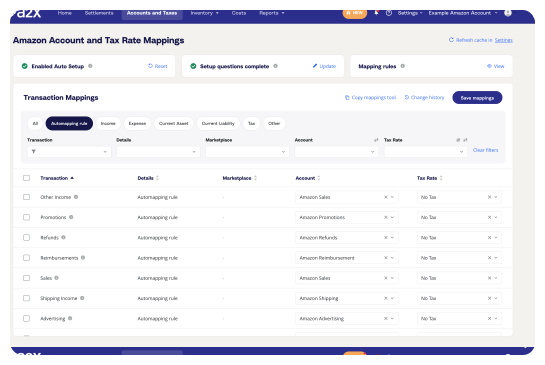
Most users open the page once, check what A2X set up, and rarely come back. It’s organized around six columns (transaction type, transaction details, country, marketplace, account, and tax rate). Rows can be group by account type: income, expense, current liability, current asset, tax, and other. The Accounts and Taxes Mapping Instructions covers it column by column.
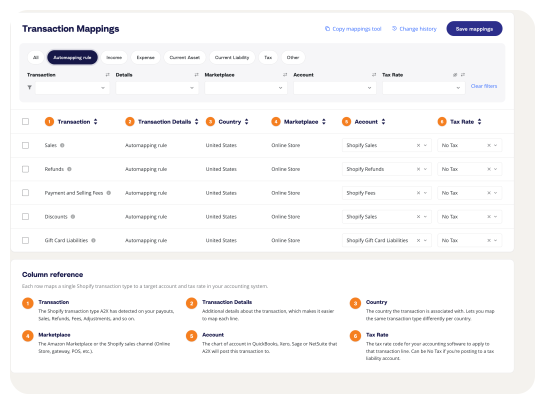
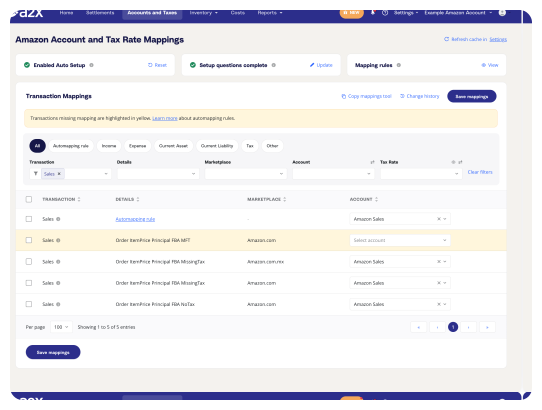
The granularity inside each category sets A2X apart from tools that post a single “tax” line. Sales tax, shipping tax, refunds tax, promotions tax, and marketplace facilitator tax are each their own transaction type, and the transaction details column adds another layer, like whether tax was included in the sale or charged separately. Map them all to one account or split them out.
Filters and bulk actions keep reviews fast. Filter by category, transaction type, country, marketplace, account, or tax rate, then select multiple rows and apply an account, rate, or tracking code at once.
The mistakes that matter aren’t always the unmapped rows; sometimes they’re the ones that look mapped but apply the wrong rate. A2X flags both before anything posts, highlighting unmapped rows in yellow and rate mismatches in red.
For a full overview of the page, see A2X’s video guide: https://www.youtube.com/watch?v=Bdd1cYLPW34
That consistency is what businesses notice first: as Easy Home Renewals puts it, “setting up the accounts mapping means that my fees etc are always recorded to the same account,” which saves the hours of spreadsheet analysis the close used to take.
How A2X keeps things automated with Auto-mapping rules
Auto-mapping rules keep the page automated as new transaction types or gateways emerge. Here’s how to set them.
When a rule is set on a category header, every transaction under it automatically maps to the right account and tax rate. Set the sales rule to a specific sales account, and any new sales transaction A2X identifies in your store maps there automatically.
If you’d rather map new transactions as they appear, leave the rule blank. A blank rule flags anything new for your review rather than auto-mapping it to a category you might not want.
How A2X handles tax across regions
Tax is where mapping gets specific, because every region treats it differently. Assisted Setup applies the regional logic automatically. If you want the groundwork, here’s how ecommerce sales tax works.
US and Canada sales tax
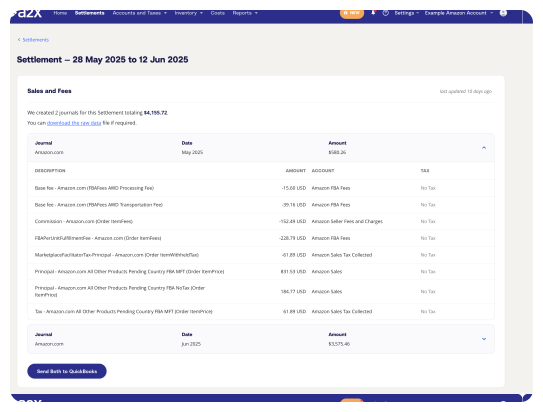
US and Canadian sales tax varies by state, city, county, and province, so A2X tracks it separately: sales lines post excluding tax, and tax goes to a dedicated liability account. For marketplaces that collect and remit on the seller’s behalf (Amazon, Walmart, eBay, and Etsy in most US states under Streamlined Sales Tax marketplace facilitator guidance), A2X records both what was collected and what was remitted. The net is 0, but both sides are recorded so the audit trail is complete. The marketplace facilitator tax accounting guide covers the bookkeeping details.
A2X doesn’t file or pay your sales tax; that’s the job of your state’s reporting or a tool like Avalara or TaxJar. It makes sure the numbers those tools start from reconcile to your deposits. Depending on your registration, you can also include or exclude tax transactions from your accounting software’s tax module.
UK, EU, Australia, New Zealand, and Singapore VAT and GST
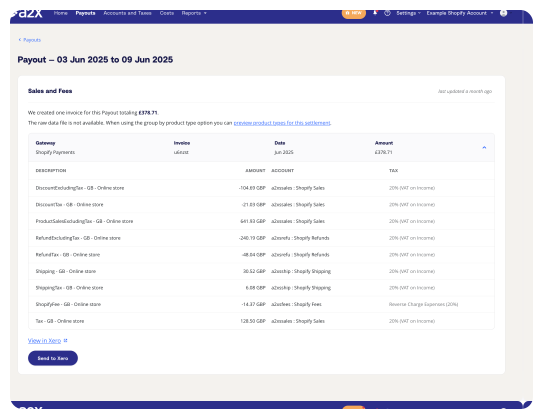
These regions use a single national rate, which lets A2X mirror-map the business’s base country. Sales and tax lines for the base country (UK VAT, Australian GST, New Zealand GST, Singapore GST) map to the same revenue account with the local rate applied; A2X sends a tax-inclusive transaction, and the accounting software allocates the tax component, automating the local return through its own tax workflow.
For sales into other regions, A2X separates the foreign tax liability onto the balance sheet, so it’s visible without cluttering the chart of accounts. For EU registrations, transactions group into main registered country, Europe, and non-EU, so expanding into a new region later doesn’t mean rebuilding the structure.
Reverse charge is the one to watch: businesses that post platform fees without it understate input VAT on every payout, and the return stops tying back to the books. A2X applies it by default. It also supports Amazon’s VAT Calculation Service, the European Commission’s OSS and IOSS schemes for EU sales, and the unbroken digital link required by HMRC’s Making Tax Digital for VAT.
This is the part multi-currency businesses are most relieved to automate. One UK Shopify App Store reviewer, Arcticus, recommends A2X “to anyone who is struggling with multicurrency, global VAT accounting,” having found it applied their individual VAT settings without the manual work.
Advanced controls for multi-channel businesses and firms
For a multi-channel business, a multi-entity operation, or a practice managing dozens of clients, the page has more depth:
- Copy Mapping. Apply an existing mapping from one A2X account to the next, so the second client takes half the time of the first.
- Product Type Grouping. Group sales by product type or SKUs so the P&L breaks revenue out by category, or so different tax rates apply to different categories. Worth it when reporting wants margin by category, unnecessary for single-category businesses.
- Clearing accounts per gateway. Map each payment gateway to its own clearing account, so when something doesn’t tie out, you know which gateway to check.
What this means for your books
Once configured, every payout posts the same way: it ties to the bank deposit, with each fee, refund, and tax at the right rate. Your monthly close becomes predictable.
That’s why A2X is trusted by 13,000+ ecommerce businesses and the accounting professionals who serve them, with a 4.9-star rating and recognition as Xero Practice App of the Year and Xero Small Business App of the Year.
Start a free trial of A2X. See what your books look like reconciled to the cent. Try A2X free
Join the A2X Partner Program and bring your ecommerce clients onto a mapping page built for the way you work. Become an A2X partner
Frequently Asked Questions

Save hours on your ecommerce accounting
A2X connects your sales channels and accounting software for fast and accurate monthly bookkeeping.
Try A2X today
ABOUT THE AUTHOR
Amy Crooymans
Amy Crooymans is the Product Marketing Manager at A2X. A member of the A2X team since 2020, Amy brings 10 years of marketing experience to the team and specializes in making complicated ecommerce accounting topics simple to understand. See for yourself in her A2X YouTube videos! Amy works closely …