A2X and Xero: Everything You Need to Know
Written by: Amy Crooymans
November 7, 2025 • 11 min read
A2X connects online sales channels (Amazon, Shopify, Etsy, eBay, and Walmart) with Xero for automated and accurate ecommerce bookkeeping.
In this guide, we’ll answer common FAQs about how A2X works with Xero.
If you have any additional questions, don’t hesitate to reach out to our support team at contact@a2xaccounting.com.
About A2X and Xero
What is A2X, and how does it work with Xero?
A2X is an ecommerce accounting app that automates the reconciliation of ecommerce transactions in accounting platforms like Xero.
A2X acts as a bridge between your sales channels and Xero – enabling you to automatically import data from your sales channels into Xero. It organizes and categorizes sales, fees, and taxes into accurate invoices that match bank deposits in Xero.
A2X was recognized as Xero UK’s 2024 Practice App of the Year, demonstrating the value that Xero’s community of accounting and bookkeeping partners experience when using A2X.
Hi, I'm Elspeth and I'm the UK/EU Customer Success Team Lead, A2X. We're so excited that A2X has been recognized as Xero UK's 2024 Practice App of the Year. In this video I'll quickly show you A2X and why it's a top-rated app in the Xero App Store and used by thousands of Xero accounting partners.
For those that don't know, A2X is an ecommerce accounting tool designed to bring data from sales channels such as Shopify, Amazon, eBay, Etsy, and BigCommerce into Xero for easy reconciliation and accurate bookkeeping. It was founded in 2014 by ecommerce business owners trying to solve their own accounting challenges and is now used by the top ecommerce accountants and bookkeepers in the world. If you're working with ecommerce clients, you know that their bookkeeping needs can be complex and take up a lot of time. Or maybe you've been hesitant to take on ecommerce clients because you want to avoid the complexity altogether.
Using A2X with Xero can make your ecommerce bookkeeping accurate and easy. Let me show you how. For this example, we'll show you how A2X works with a Shopify store. First, sign up for an A2X account at a2xaccounting.com. Next, connect A2X to Xero. All you need is your Xero login. Then you'll need to connect A2X to Shopify. Again, all you'll need is your client's login information or you can request access to the store. Once A2X is connected to Xero and Shopify, it's time to map your Shopify transactions to your Chart of Accounts. Navigate to the Accounts and Taxes page, where you can choose how to categorize your Shopify transactions to the Chart of Accounts. A2X can help automate this part. A2X allows for VAT mapping, including splitting zero-rated and standard-rated transactions as well as non-UK transactions and One-Stop Shop. A2X also allows you to use your Xero tax rates on all transactions, meaning your VAT can be calculated within Xero. You can also make deductions for VAT-inclusive expenses.
Once you've completed your accounts and tax mapping, go to the Payouts tab. This is where you can review and post payouts from A2X to Xero. The final step is to reconcile in Xero. A2X will post settlement data as an invoice in Xero. Log into Xero and navigate to the bank feed. Find the payout from Shopify. Next to it, you will see the invoice from A2X, ready to be reconciled. And there you go! Shopify bookkeeping with Xero can be that easy when you use A2X. As an accountant or bookkeeper, you're also eligible for our free A2X Partner Programme designed to help you at every stage of your ecommerce journey, whether you're supporting a handful of clients or going all in on ecommerce. Partner benefits include: one-to-one onboarding with a dedicated expert trainer who will assist you in connecting your first client to A2X, unlimited training sessions where you can learn the nuances of various sales channels, top priority support for prompt assistance with client challenges and scaling up. As your A2X client base grows, you'll unlock even more benefits: volume discounts, a dedicated Account Manager, co-marketing opportunities, a listing in A2X's accounting and bookkeeping directory, and so much more! We'd love to chat with you more about how A2X can help you make bookkeeping easier for your ecommerce clients and about the A2X Partner Program. Reach out to us at any time at a2xaccounting.com.
Watch these short videos to better understand how A2X can integrate your sales channel(s) with Xero:
- How to integrate Amazon and Xero using A2X
- How to integrate Shopify and Xero using A2X
- How to integrate eBay and Xero using A2X
- How to integrate Etsy and Xero using A2X
- How to integrate Walmart and Xero using A2X
Do I need A2X if I already use Xero?
Yes! While Xero is excellent for managing accounting, A2X bridges the gap by importing detailed, accurate data directly from your ecommerce platform, saving time and reducing errors in your accounting.
Does A2X work with every version of Xero?
A2X is compatible with all versions of Xero globally, and can connect with all plans, including the Ignite, Grow, Comprehensive, and Ultimate plans in the UK; and Early, Growing, and Established plans in the US.
Why should I use A2X instead of other connector apps?
You should use A2X instead of other connector apps because it is specifically designed to seamlessly integrate with Xero for ecommerce businesses, offering exceptional accuracy, automation, and reconciliation features tailored to your needs.
Unlike general connector apps, A2X:
- Posts summarized invoices to Xero, keeping your accounts organized and easy to manage without cluttering your ledger. (Many other apps will post individual order data to Xero.)
- Reconciles most payouts without the need for a clearing account (so there isn’t an unexplained balance).
- Accurately handles ecommerce-specific complexities, such as sales tax/VAT, refunds, discounts, and marketplace fees.
- Integrates with multiple platforms, including Amazon, Shopify, eBay, Etsy, and Walmart, providing a comprehensive solution for both single channel and multi-channel sellers.
- Ensures precise financial reporting in Xero, saving time while reducing errors and manual adjustments.
- Scales effortlessly with your business, managing large transaction volumes and supporting your growth with ease.
Setup & configuration
How do I connect A2X to Xero?
After signing up for A2X, the first step is to connect your Xero account.
Notes:
- This process assumes that you already have your Xero account set up. (You can also log in to A2X using your existing Xero login – see here for details.)
- The process of connecting A2X to Xero is the same regardless of which sales channel(s) you sell on (i.e., whether you’re selling on Shopify, Amazon, Etsy, eBay, or Walmart).
You’ll be prompted to connect to Xero when you first land on the A2X dashboard.
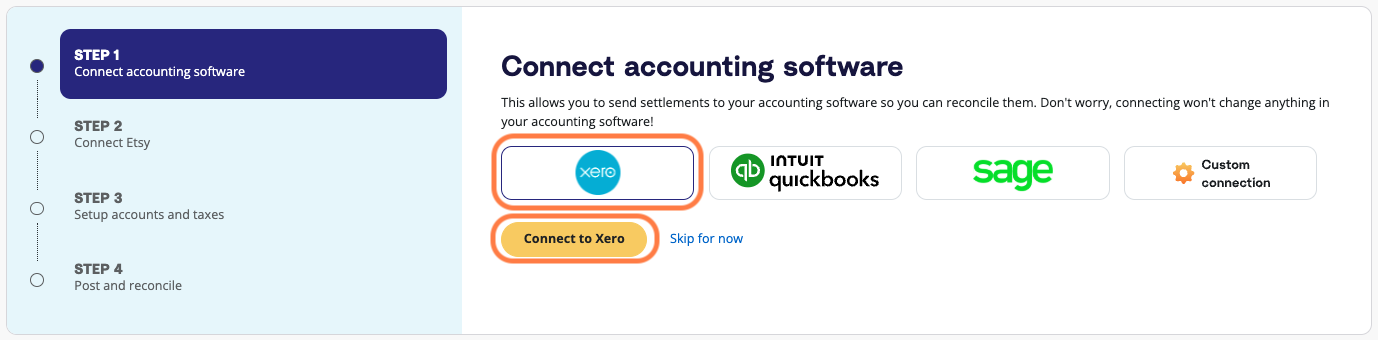
Click on the Xero logo, then select ‘Connect to Xero’.
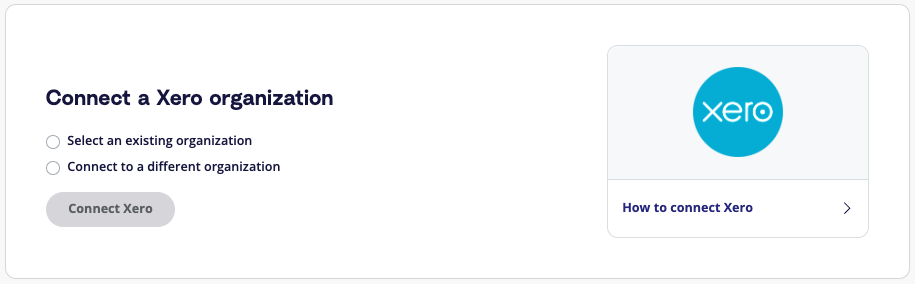
Then, select either:
- ‘Connect to an existing organization’ (if you already have an A2X account connected to the same Xero organization)
- ‘Connect to a new organization’ (if you wish to connect this A2X account to a new Xero organization)
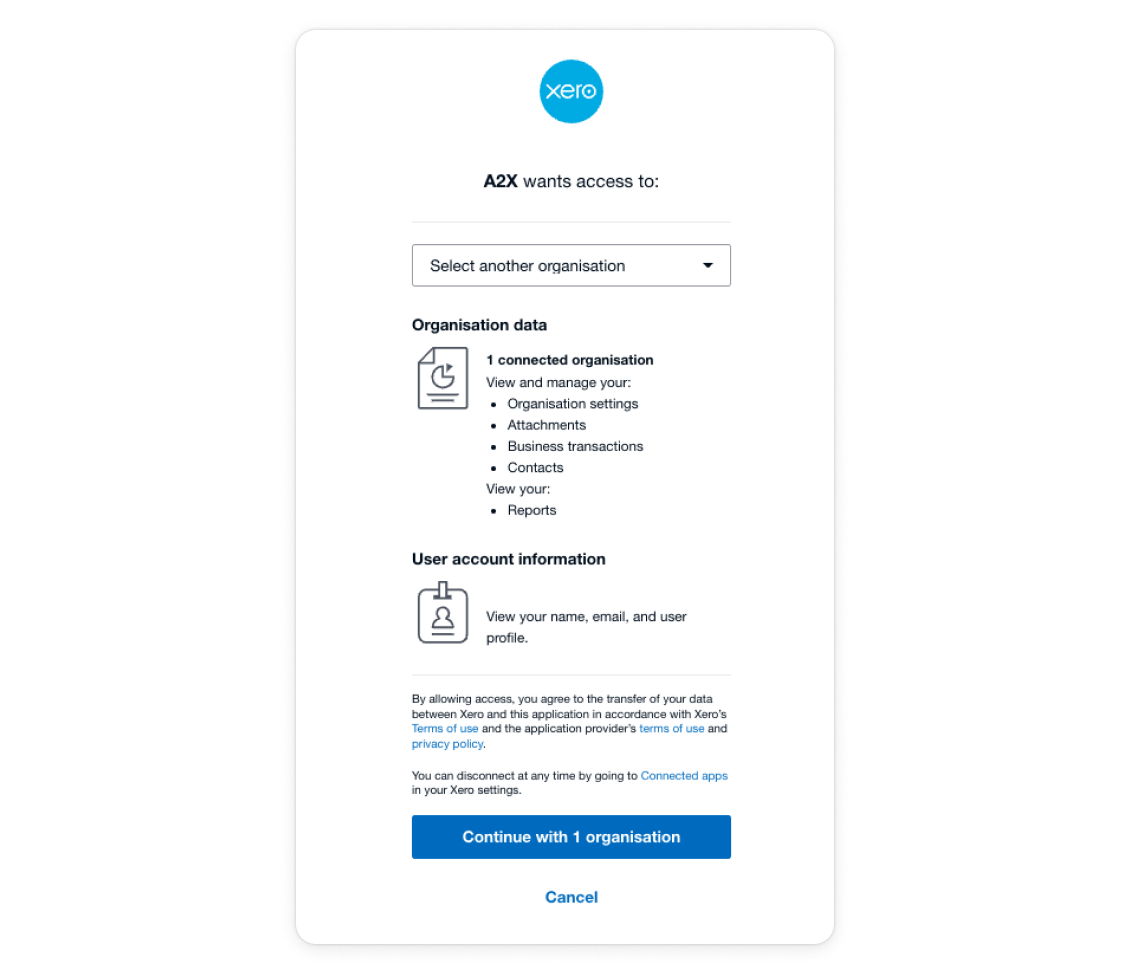
Log in to your Xero account and authorize the connection by clicking ‘Continue with 1 organization’. You’ll be redirected back to the A2X dashboard.
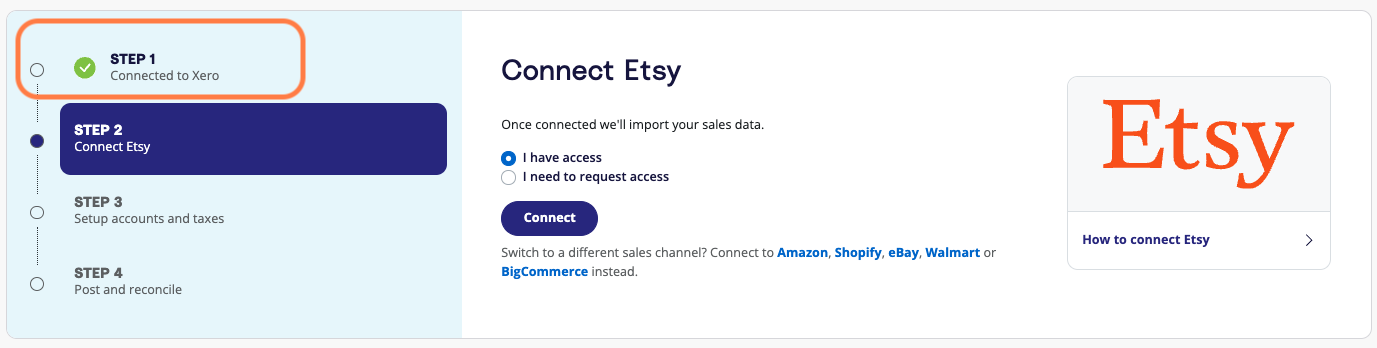
You’ll know the connection is successful when the A2X dashboard shows a green checkmark next to ‘Step 1: Connected to Xero’.
How long does it take to set up A2X with Xero?
Initial setup usually takes under an hour, depending on the complexity of your business and your transaction volume.
You can get help setting up via the following resources:
- Reach out to the A2X support team at contact@a2xaccounting.com
- Visit the A2X Support Center
- Find an accountant or bookkeeper who’s certified in using A2X
Setup steps include:
- Sign up for A2X (Note: You can sign up using your existing Xero login credentials, if preferred)
- Connect A2X to Xero (instructions above)
- Connect A2X to your sales channel
-
Map your accounts and taxes in A2X
- This step can sometimes take time, but A2X can help to automate it. A2X can also create the accounts you need within Xero and can add the appropriate tax rate to your transactions so that Xero can calculate your tax.
Once set up, A2X will automatically create invoices in Xero for your payout summaries, which you can reconcile with bank transactions in Xero.
How do I use A2X with Xero?
Once A2X is set up, it’s easy to use.
To post a summary from A2X to Xero:
- Navigate to the ‘Payouts’ tab (also labelled ‘Settlements’ or ‘Deposits’ depending on your sales channel).
- Click on the payout date range to review the details, which should include all transactions that make up the net payout amount.
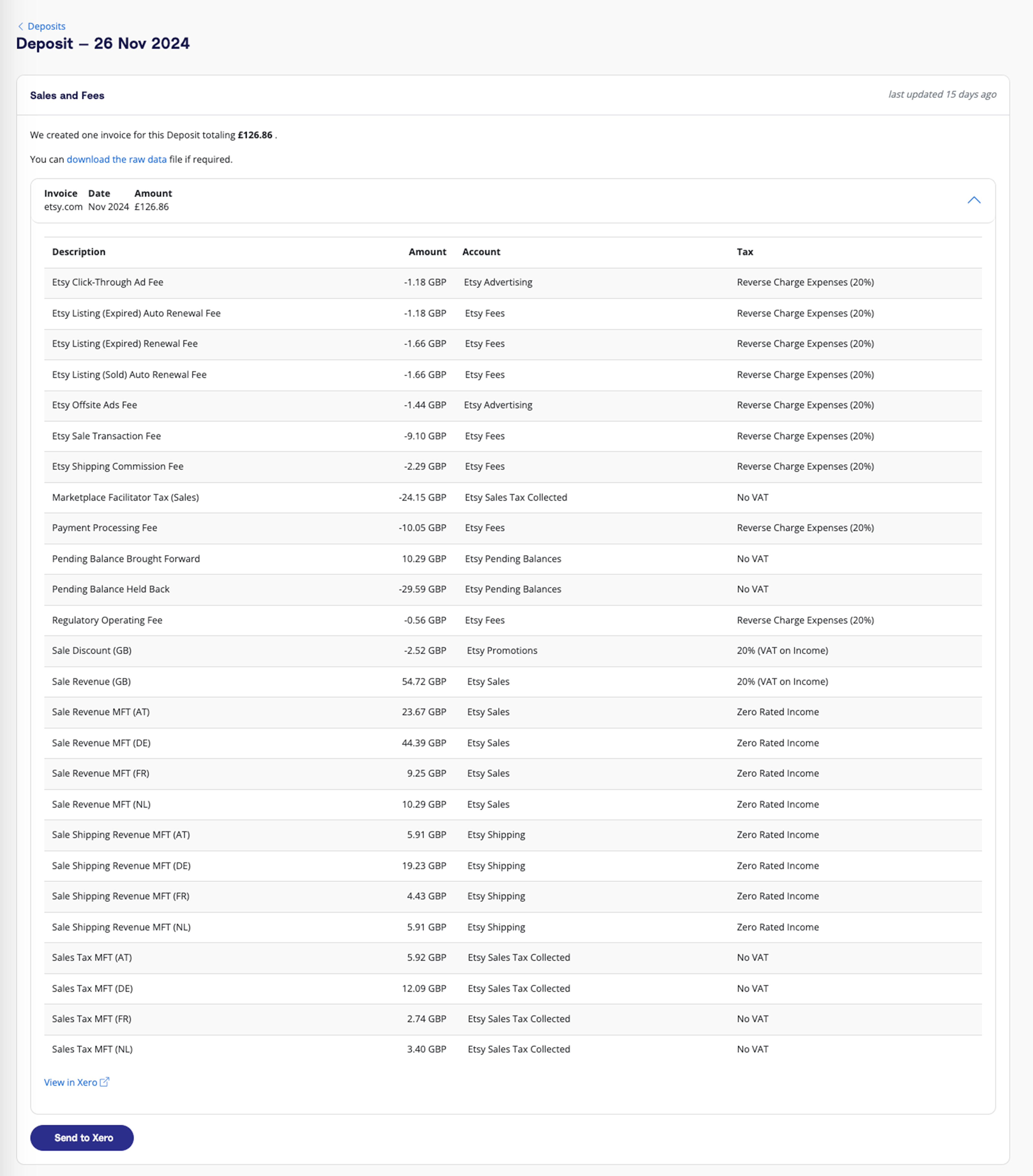
Once reviewed, click the ‘Send to Xero’ button.
A2X will create a draft invoice in Xero for the payout summary. (You can also set up A2X so that it sends an approved invoice – more details on this below.) In Xero, go to ‘Business’ > ‘Invoices’. You will see the draft invoice there.
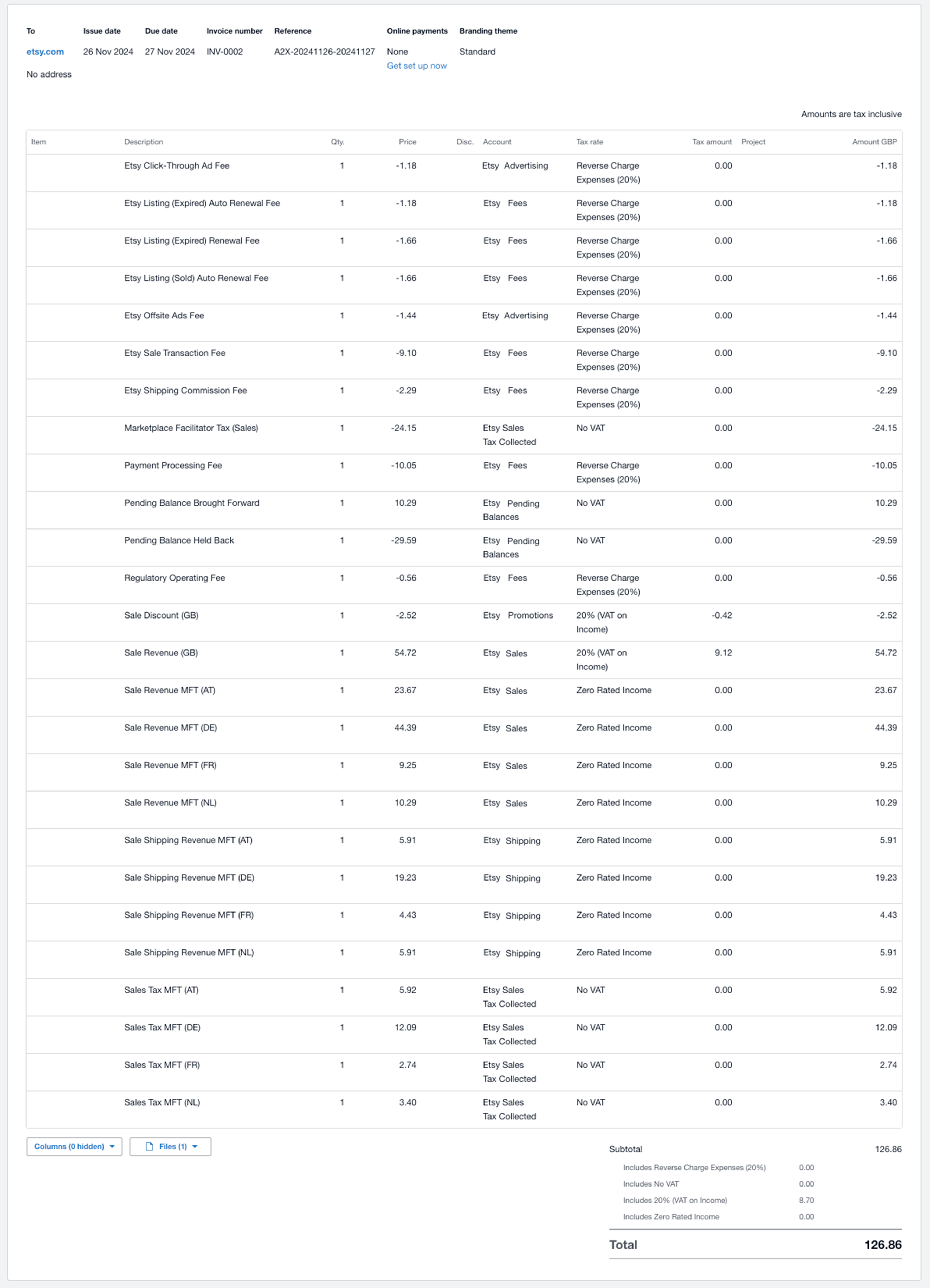
Review and approve the invoice, and it will be automatically matched to the corresponding deposit in the bank feed. Click ‘OK’ to reconcile.

How do I reconcile payouts in Xero?
Navigate to your Xero dashboard and go to the bank reconciliation screen.
You should see the payout amount from your sales channel in the bank transactions.
Match the payout with the invoice created by A2X in Xero.
If no match is found, you can manually search for the A2X invoice in Xero and reconcile it with the corresponding bank transaction.
I’m an accountant/bookkeeper, can I implement A2X at my Xero practice?
Yes, you can! Watch this webinar featuring Xero and A2X to better understand how to use A2X for your ecommerce clients at your Xero-powered practice.
Key features
Where do A2X summaries go in Xero?
A2X posts summaries as invoices in Xero.
Each invoice represents a payout from your sales channel and includes a detailed breakdown of sales, fees, taxes, and other relevant data. This makes it easy to reconcile payouts with deposits in your bank account. (Scroll up for an example of what an A2X invoice looks like in Xero!)
Can I auto-approve invoices?
To automate your ecommerce bookkeeping in Xero even more, you can select a setting in A2X that will “auto-approve” invoices sent to Xero. This means that you can skip manually approving invoices in Xero – A2X invoices will instead show up automatically matched to the bank feed in Xero.
To enable the “auto-approve” setting in A2X, go to ‘Settings’ > ‘Automation’.
Find the ‘Auto-mapping’ section, and toggle ‘Auto-Approve Invoices’. Click ‘Save’.
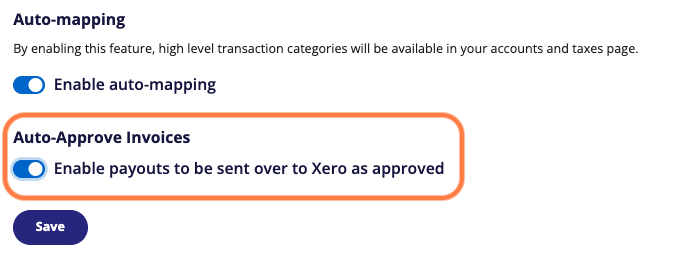
With this setting enabled, every time you send a payout from A2X to Xero, it will no longer need to be approved in Xero and will automatically match with the corresponding deposit in the bank feed.
Can I customize how A2X categorizes transactions in Xero?
Yes, A2X allows you to customize account mappings to ensure revenue, fees, taxes, and other data are categorized correctly in Xero. You can edit mappings anytime via the A2X Accounts and Taxes page.
Does A2X handle sales tax and VAT data for Xero?
Yes, A2X accurately separates VAT and sales taxes and maps them to the appropriate tax codes in Xero, simplifying your tax reporting.
Can A2X handle multiple currencies in Xero?
Yes, A2X supports multiple currencies and converts transactions into your home currency, utilizing Xero’s multicurrency features. Learn more here.
Does A2X support Xero tracking categories?
Yes, you can choose a tracking category for the invoices that A2X sends to Xero. Learn more about how A2X supports Xero tracking categories here.
Can A2X reconcile payouts from multiple ecommerce platforms?
Yes! A2X supports multi-channel setups. If you sell on both Amazon and Shopify, for example, A2X can send summaries from both platforms to Xero.
How does A2X improve accuracy in Xero?
A2X improves accuracy by summarizing transactions by payout period, reducing discrepancies, and minimizing manual data entry errors. The process is entirely automated and captures every transaction.
Troubleshooting and support
What should I do if my A2X transactions don’t match Xero?
In the rare event that discrepancies arise, review your A2X account mappings and compare them to your Xero setup. Common issues include incorrect tax rates or account mappings. If the issue persists, contact A2X Support for assistance.
We also encourage online sellers to work with an accountant or bookkeeper who specializes in working with ecommerce businesses.
Can I use A2X and Xero to process historical transactions?
Yes, A2X can import and process historical data from your sales channels, allowing you to reconcile past transactions. The amount of historical data you can fetch depends on your A2X plan.
Pricing and subscription
Is A2X included with my Xero subscription?
No, A2X is a separate subscription-based tool. However, the time and error reduction it offers often outweigh the cost.
Is there a free trial for A2X?
Yes, A2X offers a free trial so you can test it out before committing to a plan.
When you sign up for A2X (by clicking ‘Try A2X for free’ in the top right), you will automatically be in “free trial mode”. This means that you can use A2X on a limited amount of transactions from your sales channel until you choose to subscribe.
If you have any additional questions about A2X and Xero, don’t hesitate to reach out! Email us at contact@a2xaccounting.com.
Frequently Asked Questions
FAQs about A2X and Xero

Save hours on your ecommerce accounting
A2X connects your sales channels and accounting software for fast and accurate monthly bookkeeping.
Try A2X today
ABOUT THE AUTHOR
Amy Crooymans
Amy Crooymans is the Product Marketing Manager at A2X. A member of the A2X team since 2020, Amy brings 10 years of marketing experience to the team and specializes in making complicated ecommerce accounting topics simple to understand. See for yourself in her A2X YouTube videos! Amy works closely …