The Ultimate VAT Guide for Amazon Sellers in UK and Europe
Written by: Elspeth Cordray
March 23, 2026

It’s important for Amazon sellers trading into or within the UK and Europe to have a basic understanding of VAT (Value-Added Tax) because it is a regulatory necessity.
Understanding VAT is also a critical component of strategic financial planning, operational efficiency, and maintaining a competitive and compliant business.
In this guide, we’ll break down what Amazon sellers need to know about VAT from an accounting perspective.
Important: A2X does not provide VAT or tax advice. The information provided in this guide is general in nature. Please consult a local tax advisor to understand VAT as it applies to your business.
An introduction to VAT
VAT (Value-Added Tax) is a consumption tax added to the value of goods and services, which must be collected and remitted by the sellers as part of their sales transactions in these regions.
Like sales tax and GST, VAT is paid by consumers. Unlike sales tax and GST, however, it is added at each stage of the supply chain.
According to Claire Taylor, CEO of SimplyVAT.com, VAT gets charged whenever “value” is added in the supply chain. For example, when a supplier of raw materials sells goods to a manufacturer, VAT is added to the sale. VAT is added once again on the sale from the manufacturer to the wholesaler, and from the wholesaler to the retailer, and from the retailer to the consumer.
VAT is designed to be paid by the end-user, although it is collected and managed by the companies that make up the supply chain, from the manufacturer to the retailer.
In the UK, the standard VAT rate is 20%, which applies to most goods and services. However, some goods and services have reduced rate of 5%, are exempt, or are zero-rated for VAT purposes. See here for more information about UK VAT rates.
In the EU, VAT rates vary by member state. See here for more information about EU VAT rates.
How does VAT work?
If a business is required to collect VAT, the process typically goes like this:
- For companies buying goods or services, they will pay VAT on top of the purchase price. The supplier will need to remit that VAT to its relevant tax authority.
- If a customer buys goods or services from a company, they will also pay VAT on the purchase price. The company will remit the VAT to its relevant tax authority.
- The tax authorities will set out how often entities need to file the VAT they have collected. This is usually monthly or quarterly, and depending on where the company operates, they might need to do this with more than one tax authority.
- A company could either owe VAT or be owed a VAT refund, depending on whether their output VAT (VAT on sales) is greater or less than their input VAT (VAT on purchases).
For example: If a company in the UK charges £2000 of VAT on products sold, but pays £1000 of VAT on purchases made, then they would still owe HMRC £1000 in VAT.
VAT passes through the collector.
This is a simplified example. In the case of ecommerce in particular, things can get a little more complicated.
What is the main difference between sales tax and VAT?
The main difference between US Sales Tax and UK/EU VAT is the collection point: it is a “chain” (VAT) versus the “end” (sales tax).
- VAT is consumption tax collected at every stage of the supply chain, typically via “input VAT” and “output VAT” transactions. For example, a manufacturer charges VAT to a wholesaler → Wholesaler charges VAT to a retailer → Retailer charges VAT to the consumer. Businesses then offset the VAT they collect from customers against the VAT they paid to suppliers. They remit the difference to the government.
- Sales tax is collected only once at the final sale to the end consumer. For example, a manufacturer sells to a wholesaler (tax-free with a resale certificate) → Wholesaler sells to a retailer (tax-free) → Retailer charges sales tax to the consumer.
Liability and invoicing rules also differ significantly: US sales tax is typically triggered by revenue-based “nexus” and focuses on resale certificates, whereas VAT liability often starts immediately (e.g., upon raising invoices or bills) and mandates strictly formatted legal invoices.
To better understand the differences between consumption taxes, check out this guide by Quaderno: Sales Tax vs VAT vs GST - Your Guide to Consumption Taxes.
Notable changes to VAT in the UK and EU
Changes in legislation in the United Kingdom and Europe have had a significant impact on Amazon sellers who sell across the UK and Europe. Although some of these changes have been in place for a few years now, it’s important to keep them in mind since they outline who needs to file VAT and the requirements for filing.
VAT changes on fees
From 1 August 2024, Amazon changed how it bills fees to sellers established in the UK and certain EU countries (Germany, France, Italy, Spain, Netherlands, Poland, Belgium, and Sweden).
Previously, most Amazon fees – including FBA fees, merchant seller fees, and subscription fees – were billed from Luxembourg under the Reverse Charge Mechanism, meaning sellers did not pay VAT upfront. From August 2024, Amazon bills these fees from within the UK directly, meaning VAT is now charged on those fees and sellers must reclaim it through their VAT returns instead.
This change affects how these transactions should be mapped in your accounting software. In A2X, the relevant fee transactions should now be categorised as 20% VAT on Expenses (rather than Reverse Charge), with the exception of FBA fees for orders shipped outside of a GB warehouse, which should be mapped as Zero-Rated or No VAT.
Note: This change only applies to sellers established in the UK or the EU countries listed above. If your business is registered outside of these countries, no action is required.
For detailed guidance on updating your tax mappings in A2X, see our support article on the August 2024 VAT fee changes.
Making Tax Digital (MTD)
Making Tax Digital (MTD) is a major transformation of the UK tax system that His Majesty’s Revenue and Customs (HMRC) launched in 2019 to integrate and digitise tax submissions. MTD for VAT is now standard practice for all VAT-registered businesses.
From April 6, 2026, MTD for Income Tax Self Assessment (ITSA) is mandatory for sole traders and landlords with a total income over £50,000. If you are an Amazon seller operating as a sole trader, you will need to keep digital records of your income and expenses and send quarterly updates to HMRC.
To be compliant with MTD regulations, you need to:
- Check if and when you have to follow the rules. (Most VAT-registered businesses must already comply; check if the 2026 Income Tax Rules apply to you.)
- Get the right software (Xero, QuickBooks Online, and Sage are compatible).
- Charge, reclaim, and record VAT if you’re VAT-registered and practice ongoing compliance.
MTD compliance for Amazon sellers: Daily reporting vs. Settlement periods
As part of MTD’s digital record-keeping requirements, MTD outlines that transactions must be reported on a daily basis. However, Amazon provides their daily sales data via settlement periods.
HMRC acknowledges the difficulties involved in trying to clarify daily sales where a third party provides information in settlement periods. Therefore, our understanding is that it’s okay to report sales on a settlement basis in your VAT returns. However, if you are unsure of how this applies to you, it’s worth asking your accountant.
It’s important for Amazon sellers to keep the following in mind when it comes to MTD compliance:
- Digital record-keeping – Under MTD, you are required to keep digital records. This means using compatible software that can record and report the necessary VAT information, even if the underlying data is based on settlement periods.
- Accuracy and completeness – Ensure that all transactions within the settlement period are accurately and completely recorded. The total value of sales and VAT collected during this period should be correctly reflected in your VAT returns.
- Reconciliation – Regularly reconcile your accounts to ensure that the sales data reported in your VAT returns matches the records provided by Amazon.
Brexit
As a result of Brexit (the UK exiting the EU), several changes were introduced throughout 2020-2021 that impacted Amazon sellers. At a high-level, some of these changes include:
- Sellers need separate EORI numbers for importing goods to the EU and the UK
- Amazon sellers need to register their brands separately in the UK and EU
- Introduction of the EU VAT Ecommerce Package (see below)
The Windsor Framework
The rules governing trade between Great Britain (GB) and Northern Ireland (NI) have continued to evolve with the introduction of the UK Internal Market Scheme (UKIMS). This allows authorised sellers to move goods from GB to NI without full customs declarations or EU duties, provided the goods are “not at risk” of entering the EU (Ireland).
The 2021 Ecommerce VAT Package
On July 1, 2021, the 2021 Ecommerce VAT Package was introduced in the EU to facilitate easier VAT compliance for businesses selling goods online and to ensure VAT is paid where the consumers are located.
As part of the package, a few key changes for sellers took place:
- There is now one micro-selling exemption of €10,000 across the EU (for EU-based sellers).
- Sellers can centralise their VAT returns with the OSS system.
- Sellers can ensure a quicker, smoother customs experience with the IOSS system.
- There are new marketplace facilitator obligations, leaving much of the VAT collection responsibility with the platforms themselves (Marketplace Facilitator VAT/Tax).
The €10k threshold
Since 2021, a micro-selling threshold of €10,000 has applied to cross-border sales within the EU. If your total cross-border sales are below this amount, you can continue to charge the VAT rate of your home country (where you are established) rather than the customer’s country. Once you exceed €10,000, you must charge the VAT rate of the destination country. Note that this threshold applies to EU-based sellers only – UK-based sellers should refer to the UK VAT registration rules in the ‘Registering for VAT’ section below.
One Stop Shop (OSS)
The 2021 Ecommerce VAT Package also introduced the One Stop Shop (OSS) system, which simplifies VAT obligations for sellers within the EU.
Businesses based within the EU that engage in cross-border sales of goods and services to consumers in other EU member states may use the OSS to declare and pay VAT. It allows sellers to report and pay VAT for all EU sales through a single return in one EU member state, rather than registering in each EU country where they sell.
However, it is important to note that sellers in the EU typically must register for VAT wherever inventory is stored.
Import One Stop Shop (IOSS)
Import One Stop Shop (IOSS) is similar to OSS, but applies to businesses selling goods online to consumers in the EU from outside the EU.
Sellers from outside the EU can register for the IOSS in any EU Member State to collect and remit VAT on consignments valued at €150 or less. This allows for a smoother customs experience, as goods are not stopped at the border for VAT payment.
Marketplace Facilitator VAT (MFV)
Marketplace Facilitator VAT (MFV) refers to the VAT collection and remittance responsibilities assumed by online marketplaces like Amazon for transactions made through their platform.
Traditionally, individual sellers were responsible for collecting and remitting VAT for their sales. However, to streamline VAT collection and reduce tax evasion, many jurisdictions now require marketplace facilitators to handle VAT on transactions made through their platforms.
How MFV is applied in the UK and EU:
- In the UK: Following Brexit, the UK government implemented rules that require online marketplaces to collect and remit VAT for goods sold to UK consumers by overseas sellers. This includes goods located in the UK at the point of sale valued at up to £135 and, in some cases, goods located outside the UK at the point of sale.
- In the EU: Similar rules apply. Under the Ecommerce VAT Package, online marketplaces are deemed the “deemed supplier” for VAT purposes. This typically includes cross-border sales of goods within the EU by non-EU sellers, and for goods imported into the EU where the consignment value does not exceed €150.
The Marketplace Facilitator VAT rules can reduce the administrative impact on Amazon sellers, since individual sellers do not need to collect and remit VAT themselves for transactions where Amazon is responsible for VAT.
However, Marketplace Facilitator VAT does not imply that Amazon sellers should consider their VAT obligations automatically covered. Sellers still need to manage VAT obligations for transactions not covered by the marketplace facilitator rules, such as sales exceeding certain value thresholds or goods sold from stock stored in an EU country to consumers in the same country.
Similarly, sellers must maintain accurate records and comply with reporting requirements for their sales, including those where VAT is handled by the marketplace.
Registering for VAT
When Amazon sellers should register for UK VAT
The rules differ depending on where your business is based:
- If you’re a UK-based business: You only need to register if your taxable turnover exceeds £90,000 in a rolling 12-month period.
- Generally, if you are a Non-UK business (or Non-Established Taxable Person): There is zero threshold. If you store inventory in the UK (e.g., in an Amazon FBA warehouse) and sell to UK customers, you must register for UK VAT immediately before your first sale.
Register for VAT where you store stock in the EU
The general rule: If you store inventory in a country (UK or EU), you generally create a taxable presence and must register for VAT in that country immediately.
This applies regardless of your sales volume. For example, if a UK-based Amazon seller uses Amazon’s FBA (Fulfillment by Amazon) service and chooses to store stock in a warehouse in Germany, the seller must register for VAT in Germany.
This also applies regardless of whether or not you are registered for OSS or IOSS.
Once registered, you need to comply with the local VAT rules. This includes charging VAT at the appropriate rate for that country on sales to customers in that country and adhering to the specific filing and documentation requirements.
Sellers should also be aware that moving stock between EU member states can be complex, and moving goods between the UK and EU will likely involve import VAT and potentially customs duties.
Maintaining detailed records of stock movements, sales, VAT collected, and VAT paid in each country is crucial. This ensures accurate VAT reporting and can aid in audits or inspections. (Read on to learn how A2X can help maintain accurate financial records.)
If your business is located in the country where you are registering for VAT, then you may be able to sell products without needing to register for VAT until you reach a certain level of turnover. Often, Amazon will require you to register before you sell on the platform.
A couple of additional details to keep in mind:
- If you use Amazon’s Pan-EU FBA program, Amazon will move your stock to warehouses in Germany, France, Italy, Spain, or Poland. You must be VAT registered in every single country where your stock is held.
- While the EU SME Scheme (applicable for EU-based businesses only) allows for some cross-border exemptions on sales, storing physical inventory in a country usually still triggers a registration requirement. Always assume “Stock = Registration” unless a tax expert confirms otherwise for your specific setup.
Can you sell on Amazon without registering for VAT in the EU or UK?
Amazon will usually require sellers to provide a VAT registration number.
If you’re a UK-based seller and are below the £90,000 VAT registration threshold, you may be able to sell on Amazon without a VAT number. Amazon may request a statement confirming your exemption.
If you are a non-UK seller storing goods in the UK, or a non-EU seller storing goods in the EU, Amazon is legally required to collect your VAT number before you can make a sale. Failure to provide this may result in account restrictions.
This is so that Amazon can adhere to Marketplace Facilitator VAT legislation – i.e., when marketplace facilitators like Amazon are required to collect and remit VAT on behalf of their sellers for certain transactions. Ensuring that sellers are VAT-registered helps Amazon manage these obligations effectively.
By having sellers VAT registered, Amazon can also help to assure customers that they are buying from legitimate and compliant businesses, and promote fair competition among sellers (as businesses that evade VAT can unfairly undercut prices, which can put compliant sellers at a disadvantage).
Calculating VAT
Amazon VAT Calculation Service
Amazon offers a VAT Calculation Service (VCS) that can automatically calculate, collect, and remit VAT on sales made through Amazon.
Using VCS (or a strictly compliant third-party invoicing tool) is now effectively mandatory for many sellers. Amazon enforces an Invoice Defect Rate (IDR) policy, requiring you to provide a valid VAT invoice for business customers within one business day. If your IDR rises above 5%, your selling privileges may be suspended. Enabling VCS is an easy way to automate this and remain compliant.
It is also critical to ensure your VCS settings match your actual tax status so that accurate data flows to your accounting software (like A2X).
To see if you have VCS enabled in your Amazon account, click here.
Important: Make sure you have the correct VAT rates set up in Amazon. VCS can only calculate VAT accurately based on the product tax codes and VAT rates assigned to your listings. If these are incorrect – for example, if a standard-rated product is miscoded as zero-rated – VCS will charge the wrong amount of VAT, which could leave you liable for the difference. Always verify your VAT rates in Seller Central and review them whenever you add new products or expand into new marketplaces.
Calculating VAT and customs duties when importing goods
If you are based outside the EU or UK and import products to sell there, you will generally incur Import VAT and Customs Duties at the border.
Here is a breakdown of what these costs are and how to calculate them.
Customs Duties
Customs duty is a tax on goods entering the country. Its purpose is to balance the price of imported goods with those produced locally.
- When it applies: Duty is charged on the CIF Value (Cost, Insurance, and Freight) of the goods.
- Duty rate: You must find the specific “Commodity Code” for your product using the UK Trade Tariff or EU TARIC database.
- Note on “Rules of Origin”: If you import goods originating from a country with a trade deal (e.g., EU-UK Trade Cooperation Agreement), you may pay 0% duty – but only if you can prove the goods were actually made there, not just shipped from there.
Example Calculation: You import 600 t-shirts to the UK. You verify the commodity code duty rate for cotton t-shirts is 12%.
- Step A: Calculate CIF Value
- Value of Goods (£3,000) + Shipping (£900) + Insurance (£300) = £4,200 (CIF Value) (Note: Always convert foreign currencies to GBP using the official HMRC monthly exchange rates).
- Step B:
- Calculate Duty £4,200 (CIF) × 12% (Duty Rate) = £504 Customs Duty
Import VAT
Import VAT is calculated on the total value of the goods at import. This includes the CIF value plus the customs duty you just calculated.
The Calculation: (CIF Value £4,200 + Duty £504) × 20% (VAT Rate) = £940.80 Import VAT.
How to pay Import VAT (cash flow benefit): In the UK (and many EU countries), you do not necessarily have to pay this £940.80 in cash at the border. If you are VAT registered in the UK, you can select “Postponed VAT Accounting” on your customs declaration. This allows you to declare the import VAT on your next VAT return rather than paying it upfront at the port. This is a significant cash flow advantage that many Amazon sellers now use.
Remitting VAT
Is Amazon responsible for VAT collection and remittance?
Under Marketplace Facilitator (Deemed Supplier) rules, Amazon is legally required to collect and remit VAT on your behalf for specific transactions (e.g., UK/EU B2C sales under €150/£135).
- For these sales: The buyer sees VAT at checkout, and Amazon pays it directly to the tax authority. You do not handle this cash.
- Your responsibility: You must still record these sales in your VAT return to prove why you didn’t pay the tax. Important – you remain liable for ensuring your product tax codes are correct. If Amazon under-collects because you misclassified a product, you may be held liable for the difference.
A2X is designed to ensure MFT and MFV transactions are recorded in a fully compliant and auditable way.
How can I tell how much VAT Amazon has remitted?
Amazon provides specific reports to track this.
1. For VAT on Sales: The Amazon VAT Transactions Report – this is the definitive source for tax data.
Where to find it: Go to Seller Central > Reports > Tax Document Library > Amazon VAT Transactions Report.
Note: This report breaks down which sales had VAT collected by Amazon (Marketplace Facilitator) versus which ones you are responsible for.
2. For VAT on Expenses (Fees): The Tax Document Library – to claim back VAT on Amazon’s fees (e.g., FBA fees, Ad fees), you need valid tax invoices.
Where to find it: Go to Seller Central > Reports > Tax Document Library > Seller Fee Invoices.
3. For Monthly Reconciliation: The Amazon Summary Date Range Report – to match your bank deposit to your sales data (the problem A2X solves), you need the Settlement Reports.
Where to find it:
- Starting on the Amazon Seller Central Account Page, hover over the ‘Payments’ drop-down, and click on ‘Reports Repository’.
- Select the details as shown below. Select ‘Custom Date range’ if you need a different report range or other than a specific month.
- Then click ‘Request Report’.
- Once the report is ready, you can select ‘Download PDF’ next to it.
How do I keep Amazon VAT records?
Registering for VAT means you must keep a digital audit trail of every sale for 6 years (10 years for some MOSS/OSS records).
1. Making Tax Digital (MTD)
All VAT-registered businesses in the UK must use MTD-compatible software (like Xero or QuickBooks) to file returns. You cannot simply type figures into the HMRC website; there must be a “digital link” from your Amazon sales data to your return.
2. MTD for Income Tax
From April 2026, if you are a sole trader (self-employed) with gross income over £50,000, you must also keep digital records for Income Tax and file quarterly updates.
Why automation matters – Manually downloading these reports and typing them into spreadsheets breaks the “digital link” required by HMRC. Using a connector tool like A2X automatically fetches the settlement files, separates the Marketplace Facilitator tax, and posts a compliant journal entry to your accounting software – keeping you audit-ready without the manual work.
Filing VAT returns
Once you are registered for VAT in the UK or EU, you must file regular VAT returns.
For UK sellers: You generally file quarterly returns to HMRC.
- How to file: You cannot simply log in to the HMRC website and type in your numbers anymore. You must use Making Tax Digital (MTD) compatible software (like Xero, QuickBooks) to submit your return digitally.
- Be aware of the Points-Based Penalty System. You now receive a “penalty point” for every late return. Once you reach a certain threshold (e.g., 4 points for quarterly filers), you receive a £200 fine for every subsequent late submission.
For EU sellers: How you file depends on your setup.
- The “Standard” Route (Local Returns) – If you store stock in a country (e.g., Germany), you must file a local VAT return in that country (often monthly).
- The “Simplified” Route (OSS / IOSS) – For cross-border sales where you do not store stock, you typically file a single One Stop Shop (OSS) return quarterly (or IOSS monthly for imports).
- The “SME” Route – If your total EU turnover is under €100,000, you may be eligible to use the SME Scheme, allowing you to report cross-border sales on your domestic return (or a simplified update) rather than registering for OSS.
You have three main options for filing:
- Do it yourself (only recommended if you have MTD software and a strong grasp of tax law).
- Work with a professional – An accountant or tax agent who manages compliance for you.
Important: Filing ≠ Paying. Remember that submitting your return and paying your VAT bill are often two separate actions.
- UK: HMRC requires payment via Direct Debit or bank transfer by the deadline (usually 1 month + 7 days after the quarter ends).
- EU: If you use OSS, you make one large payment to your home tax authority, which then distributes the funds to the other countries.
Regardless of the method you use to file, accurate bookkeeping is non-negotiable.
Because MTD requires a “digital audit trail,” you should consider using ecommerce accounting software like A2X to automatically fetch your Amazon sales data and post it to your accounting software. This ensures your VAT return matches your actual bank deposits and keeps you audit-ready.
Accounting for Amazon VAT
You might be thinking: “If Amazon remits VAT under Marketplace Facilitator rules, why does it matter that I capture VAT in my accounting?”
Even if you rely on Marketplace Facilitator rules or Amazon’s VAT Calculation Service (VCS), there’s no way around it – you still need to do proper accounting.
Accurately accounting for VAT is non-negotiable for several reasons:
- You are legally responsible for the data (not Amazon): The EU and UK have strictly enforced VAT rules. Even if Amazon pays the tax for you, you are liable if your product tax codes were wrong (e.g., selling a standard-rated item as zero-rated). Proper bookkeeping is your only defense against these errors.
- You need a “Digital Audit Trail” (MTD compliance): Under strict Making Tax Digital (MTD) rules, you must have a “digital link” from your source data (Amazon) to your tax return. Manually typing numbers into a spreadsheet breaks this link and can lead to penalties during an audit.
- You want to claim back VAT on expenses: If you only record your net deposit, you miss capturing the VAT you paid on Amazon fees (ad fees, FBA fees). You can often reclaim this VAT, but only if your accounting software separates it out correctly.
- Cash flow and deferred transactions: In 2026, Amazon’s “Delivery Date + 7” (DD+7) policy means a significant portion of your sales proceeds are held back in a “Deferred Transactions” bucket. If you only look at your bank deposit, you will have an inaccurate view of your actual sales and cash flow for the month.
But, getting accurate numbers can be difficult – and there are a few things that Amazon sellers should keep in mind.
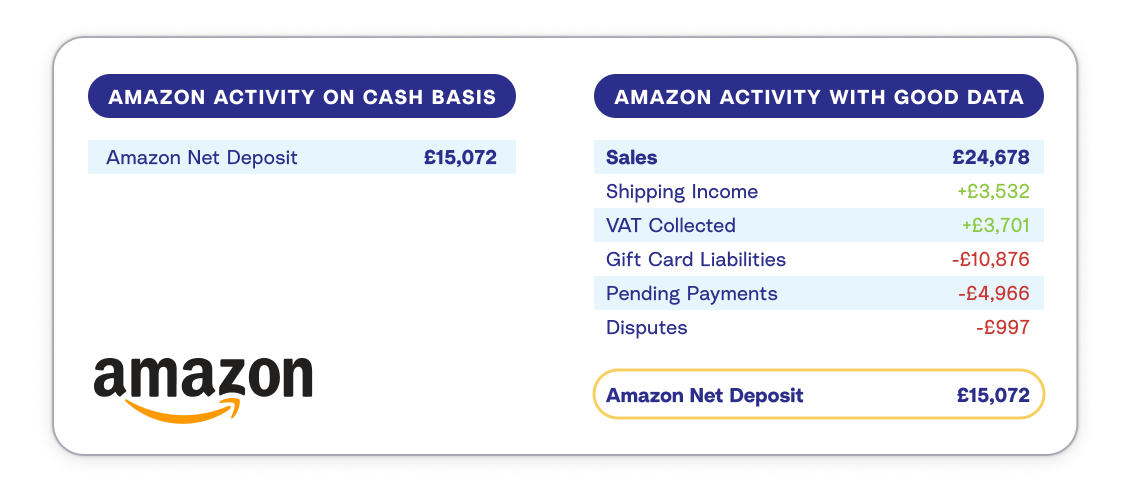
Don’t record your Amazon deposit as income
Amazon sellers know they get paid via a deposit roughly every two weeks. What many don’t realise is that this sum is not your sales revenue.
Your deposit is a “net” number calculated as:
Sales (minus VAT collected by Amazon) minus FBA & Commission Fees minus Advertising Costs minus Refunds minus Deferred Funds (held for 7 days)
Therefore, recording your Amazon bank deposit as “Income” is dangerously incorrect.
- It under-reports your revenue: Because Amazon has already removed fees and VAT.
- It messes up your tax return: You might pay tax on the net amount instead of the gross sales, or miss reclaiming VAT on fees.
- It confuses your timing: With deferred transactions, the money landing in your bank today might be from sales made weeks ago.
Fortunately, this is exactly how A2X can help with your Amazon accounting. It splits your settlement file into clean journal entries – separating sales, fees, VAT, and deferred holds – so your accounting matches reality, not just your bank balance.
Amazon VAT transactions
There are various different types of transactions that make up an Amazon deposit, and also various VAT transactions (especially if you’re selling on multiple marketplaces).
An Amazon settlement file is a complex mix of sales, fees, refunds, and – crucially – different types of tax transactions.
Because Amazon now collects VAT on your behalf for many sales (under Marketplace Facilitator rules) but not for others (where you remain liable), you cannot simply treat all “tax” lines the same way.
How A2X identifies these transactions: A2X automatically detects the tax status of each sale and splits them into correct categories for your accountant.
Examples of 2026 Transaction Types:
- MarketplaceFacilitatorTax-Principal (Amazon Collects): In this example, Amazon acted as the “Deemed Supplier”. They collected the VAT from the customer and remitted it directly to the tax authority.
- Your action: You must record this sale to prove your revenue, but map the tax to a “zero-rated” or “MFT Clearing” account, as you do not owe this cash to the government.
- Principal - Amazon.co.uk jurisdiction GB (You Collect): This is a standard domestic sale (e.g., you are a UK business selling to a UK customer above the marketplace threshold). Amazon paid the VAT to you.
- Your action: You must set aside this VAT and pay it to HMRC in your next return.
- NoTax Export (Zero-Rated): An order shipped to a customer outside the UK/EU (e.g., a US buyer purchasing from Amazon.de). No VAT was charged.
- Your action: You must report this as a “zero-rated export” to prove why no tax was collected.
Why this distinction matters: Understanding the difference between “Amazon-remitted” and “Seller-remitted” VAT is a very important part of Amazon bookkeeping.
Correctly separating these transactions allows you to:
- Prevent double taxation – If you pay VAT on sales that Amazon already paid for, you are paying tax twice.
- Reclaim the correct VAT on expenses – Since August 2024, Amazon now charges VAT directly on fees such as FBA, merchant seller, and subscription fees for UK and certain EU sellers. Correctly categorising these ensures you can reclaim the VAT you’re entitled to. See our guide on the August 2024 VAT fee changes for more detail.
- Keep clean, auditable books – Separating MFV (VAT collected and remitted by Amazon) from VAT that you are responsible for helps to ensure your records are accurate for both VAT and sales tax purposes. If you use A2X, this split happens automatically using the default settings.
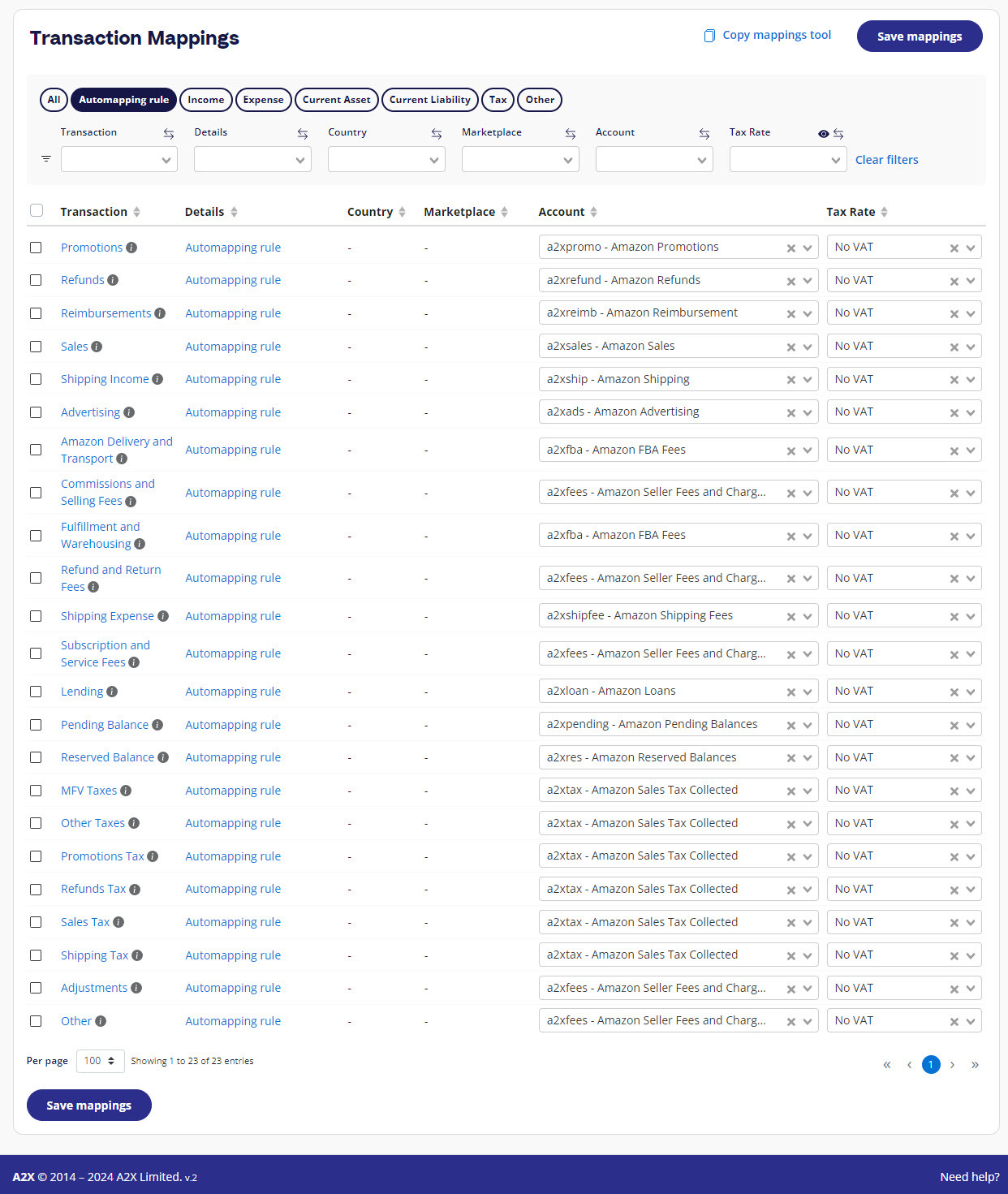
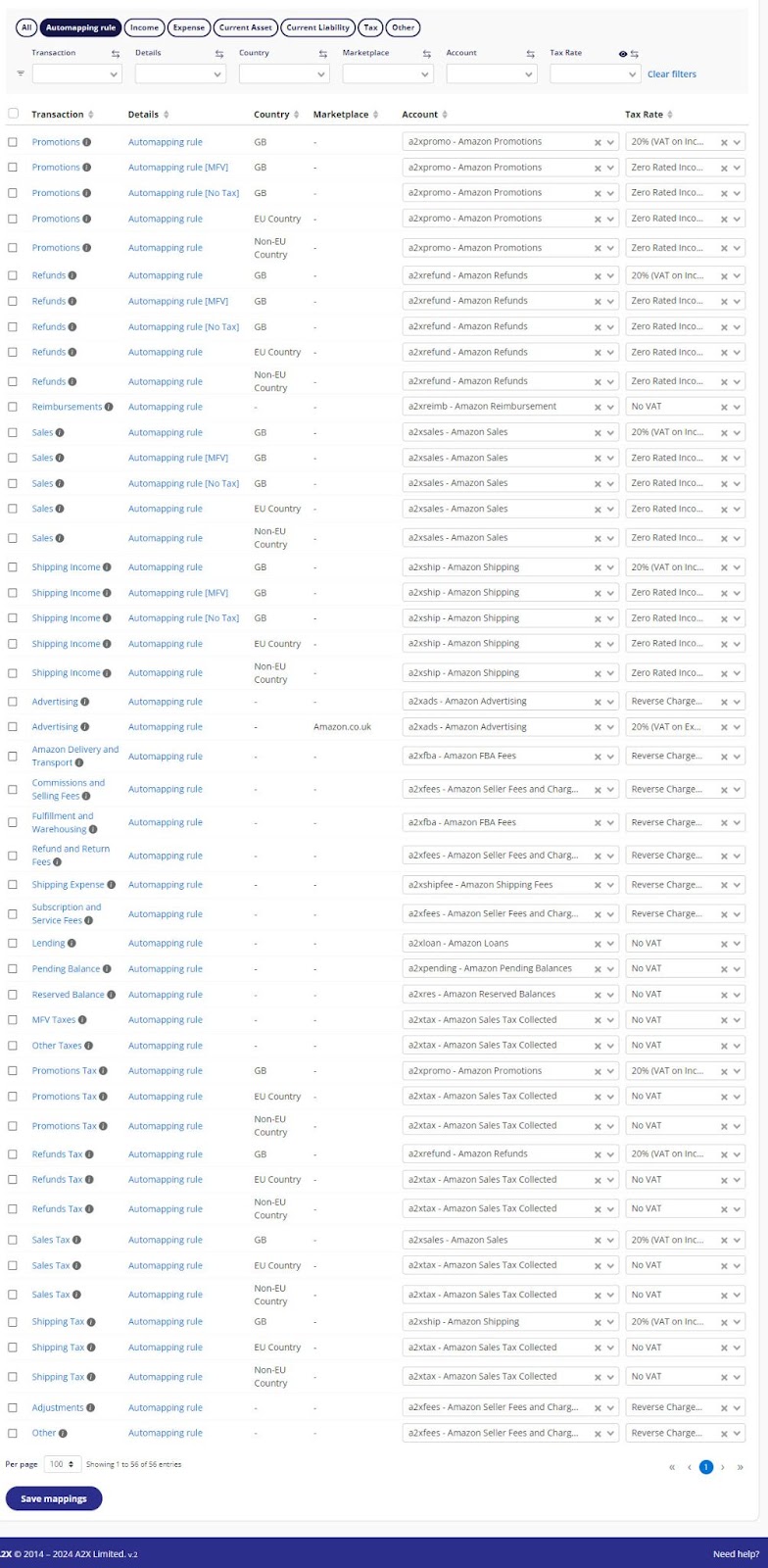
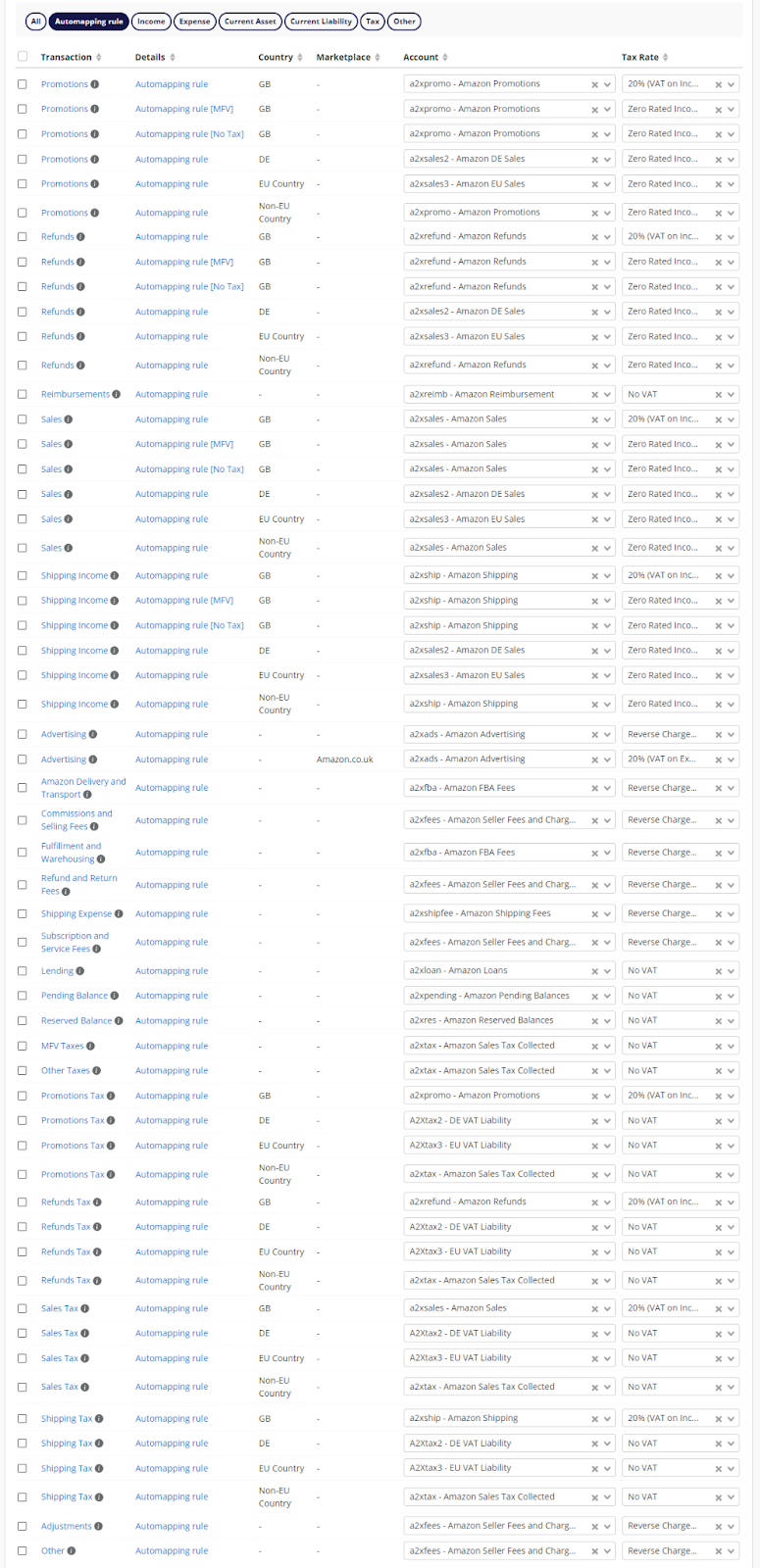
A2X VAT mapping
Get a step-by-step guide for how to set up A2X for Amazon VAT here.
A2X can help you automate how you categorise your VAT transactions to your Chart of Accounts – check out the examples below.
Example 1: For an Amazon seller with no VAT registration(s)
Example 2: For an Amazon seller with 1 UK VAT registration
Example 3: For an Amazon seller with 1 UK VAT registration plus 1 or more EU VAT registration(s)
Note: You have the option to split out additional countries for separate VAT treatment, wherever helpful.
Accounting and record-keeping for VAT
UK VAT transactions (seller-remitted)
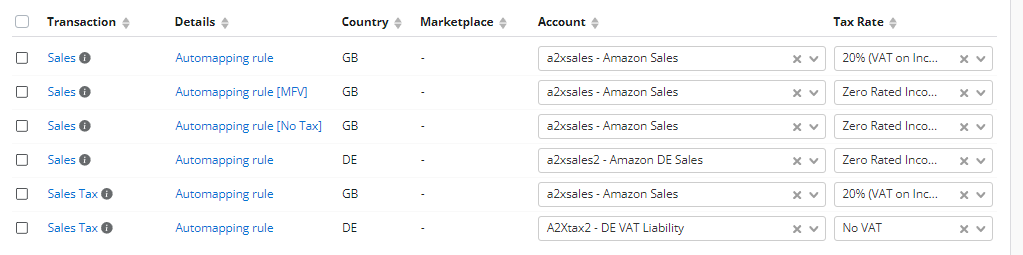
When using A2X, transactions indicating taxable sales where you are liable for the tax are categorised to a revenue account with the Standard 20% VAT rate applied (or the appropriate reduced rate).
- Result: This splits the transaction – the net income goes to P&L, and the VAT portion goes to your system VAT Liability account on the Balance Sheet, waiting to be paid to HMRC.
MFV and VAT on “Deemed Supplier” sales
When a transaction triggers Marketplace Facilitator rules, Amazon acts as the “Deemed Supplier.” You will see these transactions clearly described in A2X as “MFV” (Marketplace Facilitator VAT) or “MFT” (Marketplace Facilitator Tax).
Why separate them? A2X allows you to separate these MFV transactions from your standard sales. This is critical because:
- Standard sales – You owe the VAT to the government (Credit VAT Liability).
- MFV sales – Amazon owes the VAT to the government and remits it directly – the money never passes through you as the seller. However, you still need a record of these transactions, and A2X captures them automatically so your books reflect the full picture.
Correct accounting treatment (the “clearing” method)
For MFV transactions, you should map the tax amount to a Liability Clearing Account (or a dedicated “Tax Collected by Amazon” account) rather than your main VAT Liability account.
- The Logic – A2X records two offsetting tax lines for MFV transactions directly from the settlement data. Because these entries cancel each other out, you won’t accidentally pay this tax twice – and you’ll have a clear record showing exactly what happened and why.
Why record MFV if Amazon pays it?
Even though Amazon remits the cash, you must still record the transaction in your books for two reasons:
- Total Turnover Reporting (Box 6): In the UK (and many EU states), you must often report the net value of these sales in Box 6 of your VAT return (Total Value of Sales), even if the VAT due in Box 1 is zero.
- Financial Accuracy: Recording it correctly ensures your P&L reflects your true sales volume and makes sure all tax transactions go through the balance sheet, which is vital for business valuation and audit trails.
Tracking for audits
Tracking Marketplace Facilitator VAT is essential for financial auditing. If HMRC or an EU tax authority requests evidence of your sales, you need a clear “Digital Link” showing which taxes were paid by you and which were paid by Amazon. A2X automates this split, keeping your audit trail clean.
Accounting for Amazon expenses
For UK and EU sellers, the way Amazon fees are billed changed from August 2024. Previously, most fees – including FBA fees, merchant seller fees, and subscription fees – were billed from Luxembourg under the Reverse Charge Mechanism, meaning sellers didn’t pay VAT upfront. From August 2024, Amazon began billing these fees from within the UK, so VAT is now charged directly and must be reclaimed through your VAT return.
This means these fees should now be recorded as 20% VAT on Expenses in your accounting software, rather than as Reverse Charge expenses. The exception is FBA fees for orders shipped outside a GB warehouse, which should be mapped as Zero-Rated or No VAT.
Note that advertising fees are not affected by this change – these were already billed from the UK prior to August 2024.
To clarify the general VAT treatment for advertising:
- UK Advertising: Recorded as 20% VAT on Expenses.
- EU Marketplace Advertising: Continues to be recorded as Reverse Charge Expenses.
To reclaim the VAT on your fees, you’ll need valid tax invoices. You can find these in Seller Central under Reports > Tax Document Library > Seller Fee Invoices. A2X can be configured to automatically apply the correct VAT rates to your fee transactions, making sure your input VAT reclaim is accurate.
Step-by-step Amazon accounting guide
For a step-by-step guide to Amazon accounting using Xero, watch this video featuring Elver Ecommerce Accountants.
Here is the clean transcript with the timestamps removed and the text formatting smoothed out for easier reading:
Chapter 1: By the Books: Step-by-step accounting guide for Amazon Sales & VAT with Xero and A2X
GEOFF: Thanks so much everyone for joining us for today's webinar: Step-by-step accounting guide for Amazon Sales and VAT with Xero and A2X. Big thank you to our expert hosts today, Oliver and Steve Blackmore from Elver E-Commerce, who are one of the UK's premier ecommerce accounting practices, as well as Elspeth Cordray who is the head of Customer Success in the UK, leading a team of eleven UK support team members. So from that point, I'm just going to pass the mic over to Steve who's going to talk a little bit about Elver E-Commerce and why they're so well suited to talk to today's topic, which is Amazon Sales and VAT Accounting. So Steve, over to you.
STEVE: Okay. Thank you, Geoff. We are the go-to financial partners for UK...
Chapter 2: Meet Elver E-Commerce Accountants
...e-commerce businesses. Each e-commerce business is unique as determined by its size, the owner's aspirations, the product it sells, the channels and territories it sells in, and we tailor our services to each client to meet its unique needs. Our expertise will help free you up to focus on innovating, selling and growing your business. We specialise in ecommerce because it is genuinely different to other types of businesses and faces a unique set of challenges in terms of its finances, whether that's the daily bookkeeping, routine tax compliance forecasting, or performance tracking. And our vision is for every ecommerce business in the UK to be armed with precise financials and insights empowering them to run successful growth orientated operations.
Chapter 3: Agenda
ELSPETH: Well, hi everyone. Thank you again for attending our Amazon and VAT Accounting webinar. We hope that you'll have some takeaways from this that will be really useful going forward. We're going to cover three areas and then we're going to have a question and answer session.
Our first area is why accurate Amazon and VAT Accounting is key to profitability as ecommerce sellers or accountants and bookkeepers who support ecommerce sellers. I think our main goal is always to have profitable, healthy businesses and having accurate financial information helps you to make good decisions going forward and also make sure that you're taking care of all your responsibilities in terms of VAT and other tax requirements.
The second area we're going to cover is how to accurately automate Amazon and VAT Accounting. We're going to give you a quick overview of some of what A2X can help you with in that area.
And then we're going to have a third section on what to consider when using Amazon plus A2X Accounting plus Xero. We've got some checklists that I hope you're going to find really useful for your month end processes and also some discussion on reporting. So using this financial information to have good insights to make good business decisions.
We're going to follow that up with a question and answer session. So, as Geoff already mentioned, if you have some questions already, please feel free to start putting them in chat. But at the end we'll open the floor and be able to talk to Steve and Oliver at some of the other questions that you may have as you go through the webinar. So, top level overview. As we spoke about profitability and healthy businesses, we do...
Chapter 4: Why does accurate Amazon accounting matter?
...know that unfortunately, 32% of ecommerce businesses fail because they run out of cash. We also know that 29% fail because of cost and pricing imbalances. That's a really big one for ecommerce and we're going to cover some of the ways that you can check and keep track of your cost accounting later on in this webinar. Another trend that's noticed is that many businesses fail because they do try to scale too quickly and all of these areas can be helped by having really accurate financial information.
Now, as we know, we're so excited to have Elver here today. Oliver and Steve are on the front line of supporting ecommerce businesses as they grow and to have accurate accounting information. And so I'm just going to give Steve the floor just now to share a couple of stories from their experiences so far.
STEVE: There's actually quite a few examples of how things have gone wrong and how things have gone very well for some of our existing clients. But of course, all the bad stuff happened before they were clients. Two in particular spring to mind. The common thing with all of these is they did actually engage with accountants, but of course they were not ecommerce specialists. And in two instances they had underrecorded sales and underreported their VAT liabilities to the extent of over 100,000 pounds. In one instance, this was discovered because the owner just happened to read something online and realised that the way it was being done was wrong, despite all the assurances he had to the contrary. In the other case, unfortunately, HMRC had initiated an inquiry, but we were able to step in and do all the calculations and smooth that whole process.
In another example, the issue wasn't a case of underrecording. Well, it was a case of underrecording. It wasn't a case of simply recording their net supplements as income. In this case, it was done manually. And Amazon changed the reports that they were using. And it took them about a year and a half to realise that their numbers were all wrong as a consequence, of using a report that they thought was based on different numbers.
On a more positive note, in fact, that very same client that I just mentioned, they were not getting any management accounts on a monthly basis. They're now getting those. And we've done additional analysis since and that has highlighted to them the fact that their Amazon sales, which is about 50% of their business, is—well, they've actually been quite shocked at how unprofitable that Amazon sales are. So they're now about to make some very crucial strategic decisions as to how they take that forward.
OLIVER: Hello, everyone. So I'm going to be talking a bit today about why it's so important to get your Amazon accounting right. But before I do, I think I ought to solve the mystery of why there are hundreds of balloons behind us in the office. We are in the midst of tax season here and actually each balloon represents a tax return that we need to file. So we've got a bit of a challenge going on with the team and each time we file a return, we're popping a balloon and there are prizes to be won, so it's keeping us all excited throughout tax season.
So anyway, so why is Amazon accounting so important and why do we need to get it right? So, first point to make is with regards to how your settlements get paid out. So typically for most Amazon sellers, you're going to be getting one settlement every fortnight, so nearly every payout you're going to receive is going to be overlapping on your month end. So in order to get an accurate monthly P&L, those settlements need to be split out to put each month's relevant part of a settlement into the right month. If you're not doing that, you're going to end up with margins that are essentially all over the place month to month. To take an extreme example, you could have one month where you've got potentially six weeks worth of sales and think, woahoo, I've had a fantastic month and then the next month comes around and then you've only got a couple of weeks worth of sales because of how those settlement periods have fallen. So it's really important to be getting those split out.
There are also lots of different transaction types within a settlement, the ones you can see on the screen there. So sales adjustments, commission reimbursement fees, taxes are just a couple of examples that there are literally hundreds of different transaction types and subtypes within those transaction types as well. So to get an accurate idea of what's going on in the business, you really need to be analysing those out much further than just looking at your net payouts.
And the other key point to make really, is that if you're not doing that analysis and exploding your payouts, you're almost certainly going to be making mistakes in filing your VAT returns. It could be that you're overpaying, could be that you're underpaid. More likely than not, if you're not exploding your payouts, you're going to end up in a position where you're underpaying your VAT and then you're sort of treading down the path of ending up in a position where you might get penalties from HMRC further down the line.
Chapter 5: Amazon deposits aren't just sales!
So this is an example of what a fortnightly Amazon settlement looks like. So here we've got 60K, or just over 60K coming into the bank. And that left hand side there, if you've got Xero set up and you've got your bank feed connected, that's all the information you're going to get. If we look on the right hand side, this is the kind of analysis that you're going to be wanting to get with a tool like A2X Accounting and it's really important to analyse out between those different categories. So, taking a couple of examples we've got on the screen here.
So Amazon FBA fees, for example, are subject to what's known as the reverse charge mechanism. So essentially what that means is that they are services that Amazon bill your UK company for from the EU, and there is no VAT to reclaim on those fees. However, the advertising fees are billed from the UK and therefore there is VAT to reclaim. So you can start to see how if you're not analysing those payouts out, you're likely to end up in a position where you're making VAT mistakes.
Chapter 6: Don't record net deposits as income
So this is one of the really common errors that we see and kind of ties back in with the horror stories that Steve was mentioning. So it's quite common to see that Amazon sellers will just be treating their net deposit as their income and in every case that is going to be wrong and result in some VAT mistakes. So let's have a look at what problems that causes.
So, if you're not analysing out between the different constituents of a payout, you're almost certainly going to end up in a position where you're understating or overstating, but more likely understating your tax liabilities, you're going to have skewed profits, so not going to give you the insight you need to make decisions. You also won't have any information with regards to fees within your accounting data. And as I mentioned earlier, you're going to have a lumpy month to month P&L because of those timing issues with the fortnightly settlements.
And the main issue that all those points really feed into is that when you come to sell, a potential acquirer is going to want to see the last few years worth of books. And if they haven't got the detailed analysis within them that shows the full breakdown of revenue and fees, that they're not going to be able to make an informed decision on whether to move forward with acquiring your business. And then at the best case scenario, you're looking at needing to go away and redo your books to help facilitate that sale. But in a lot of cases, if you came to a potential acquirer and your accounting data was all just based on net deposits, the reality is you're going to have a potential acquirer that's walking away from the deal and then you go and redo your books, but then you're still needing to find a new acquirer.
Chapter 7: Don't record VAT as income
So another really common issue we see is treating the VAT received on your payouts as additional revenue. So it's really important that that gets split out and mapped into your balance sheet and recorded as a liability, otherwise your P&L is going to be significantly wrong. So that leads to quite a few different issues.
So one being that if you recognise that as revenue in your accounts, you're going to be painting a much prettier picture to yourself than the reality and be spending money that is essentially yours, not yours, it's money that is owed to HMRC as part of your VAT returns. So that of course, in turn leads to compliance issues with HMRC in that you're not paying the VAT that you need to be.
And if you're accounting for VAT as revenue in your PNL and all your sales are standard rated, then you're going to be overstating your revenue by 20%. For a typical Amazon seller, a 20% gross margin would be pretty healthy. And if that's the picture you're painting to yourself by including that in your income, then the reality could be that you're just breaking even.
And another really important point to make for UK sellers looking to expand out into the EU is that when you do so, you'll need to be separately tracking your EU VAT liabilities. And it gets even more complicated when it becomes to EU VAT because depending on the circumstances of the sale, it may be that Amazon is responsible for collecting and remitting the VAT under the marketplace rules, or it may be that you need to pay that VAT on your VAT return separately. So it's important to then be able to split out between marketplace and non-marketplace rule sales to get your EU VAT correct.
So, to summarise all that, why essentially, if you're not accounting accurately, you have limited insight into profitability and business performance and could be over or underpaying tax, and in reality, most cases you will be underpaying tax.
Chapter 8: Introducing A2X for accurate and automated ecommerce accounting
So, back over to Elsperth now to talk more about how A2X can help.
ELSPETH: Thank you, Oliver. So, Oliver's done a great job of explaining some of the challenges when it comes to dealing with ecommerce deposits. And we're just going to do a quick overview of A2X Accounting and how that can help. A2X pulls all the uncategorized data that we get from those ecommerce platform for sales, fees, refunds, taxes, disputes, advertising fees from all of your channels and will consolidate it all into neat payouts for you.
If you've ever done that manually, you'll know how time saving it is to be able to automate that part of the process. A2X Accounting auto categorises the data into accurate summaries that span the right time periods. We spoke about that with Oliver. It's important that fees and sales are accounted for in the correct accounting period and A2X will automatically split them for you. And then we match back to Xero with one click reconciliation back to the bank account. So we're always looking for that magic green match on the Xero bank feed for Amazon deposits.
In the last few years, we've introduced a number of new automation features such as auto-approved Invoices, which can give you that really fast Xero bank reconciliation that everyone's looking for. The brilliant thing about this is that having all that data transferred quickly into Xero gives you the ability to then view it in Xero in various different ways. It'll let you see your profitability accurately when you run your profit and loss report. If you look at this one over on the right, you'll see that we've actually been able to—this is a seller selling on eBay, Shopify and Amazon—we've been able to split those transactions, also split some of the costs out. You can even refine it more than this if you've got particular customizations. We have people doing very clever things for tracking categories, so if you've got particular reports you want to be able to run. Xero tracking categories are very profitable. So if you've got very useful, for example, if you want to see how profitable am I on one ecommerce platform compared to another. So always chat with us in Chat if you want to do some more customization, so you've got an idea for something you want to do with your Xero reports and we'll try and help as much as we can.
A2X has been delivering accurate accounting for Amazon sellers in the UK since 2013. It's really hard to believe it's been that long, but it has. We were very excited – in 2022 we were Xero App Partner of the Year and we do have thousands of five star reviews from sellers and their accountants. We try and provide really good support. We understand it's complex and we want to support you as much as we can to be successful using A2X and Xero. So now we're going to move on to the third part of our webinar, which is just examining...
Chapter 9: Checklist: What you need for a monthly Amazon bookkeeping process
...some month end processes that you can use, that you can implement when using A2X and Xero together to get the best outcome and the best reporting.
So for this month end process, you're going to want to gather a few pieces of information. It's always useful to have your monthly bank and/or credit card statements. Obviously you'll have your Xero bank feeds, but it's always good to be able to refer back to the originals. We always recommend having access to the Amazon tax document library and Amazon Seller Central. You can find that by going to Reports and Tax document Library. The important part about that is that's where you can access all of your fee invoices from Amazon. And as Steve mentioned earlier on, those can vary depending on the type of invoice there is in that Document Library. And so it's always good to be able to go and check and see the actual tax rates. So, for example, UK advertising we often see does have 20% VAT applied.
The third thing that it's good to have to hand is your Amazon loan statement. If you are repaying a loan via settlements in Amazon, A2X will pick that up. But it's good to have that documentation to refer to as well as you wrap up the month. And then the last thing that you're going to want is your invoices for purchases of stock. So where you've purchased items to sell on Amazon, you're going to want to have those ready to enter into Xero and make sure you can match those back to your bank as well.
Chapter 10: Checklist: Step-by-step guide to monthly Amazon bookkeeping using A2X and Xero
So step one is to review your transactions. You would first start by going to A2X and updating any mappings that might be required. So anywhere where you need to assign a tax or a tax rate or an account, and then you can send your invoices through to Xero.
One thing we always like to flag up is that when you're on Amazon EU, we do have a waiting period for finalised Amazon VAT data. It usually finalises on the fourth of the following month. So, for example, for a period March 25 to April 5, this would be on hold until May the fourth. Until that date, settlements will be marked on hold in A2X. And we do recommend waiting until that date to post those periods as then you'll have the full country data. For VAT purposes, especially important if you have multiple tax jurisdictions. We do have a workaround if you need to close a month earlier. So talk to Support if you need help, and you do need to close your month earlier than that.
The next step is to raise any purchase invoices in Xero for any stock that you've purchased during the period and then match those off to your bank feed. And then to finish your bank reconciliation, you'll most likely after you've matched all the Amazon deposits to A2X data and you've raised your purchase invoices, you'll most likely have some other transactions to reconcile. So once that's finished, you can then move on to the next step.
And for our step four, we've said that a good process is to check for any duplicate invoices or bills after reconciliation. One thing we do see sometimes is if you were seeing a missing settlement in A2X, then it's often that Amazon has just archived it. It's a relatively simple process. To release it, you can go to Amazon Seller Central reports, payments, and all statements and confirm that they're available for direct download. If they're not, you can normally click a button and they'll be ready in a few seconds, and then you'll be able to fetch them into A2X. If you have any troubles with that, just let us know and we'll help you work around it.
OLIVER: Just one point to mention on the duplicated invoices or duplicated bills. A common issue we come across is that it's often a bit too easy to get things reconciled on the bank feed. And you'll create a spend money or receive money transaction to get something off the bank feed. And that's what's actually then duplicating the invoice or bill, which comes through further down the line. So that's another thing to watch out for as part of step four.
ELSPETH: That's a really good point, Oliver. Yeah. Okay, so the next step – we're getting down into fine tuning at this point – is to review the Amazon pending balances account. I know, Steve, you must see this all the time, so I was going to ask you to jump in at this point and explain your processes for this part.
STEVE: It's the same with, to a large extent, pending, reserved, and carried. They're all very similar in that any balance on that account should represent the pending, reserved, or carried balance at the end of the month, and they should reverse at some stage during the following month. In the case of carried balances, it should normally reverse on the first of the following month. So you really need to just be checking that your pending, reserved, or carried balances in your balance sheet do represent the last settlement of the month. If there's any other balances in there, then possibly that you've missed a settlement or something like that. But your pending balances in your balance sheet should reconcile to the final settlement of the month.
OLIVER: Yeah, I think another point to mention on that is a good check to do is to run an account transaction report for the pending reserve or carried balances. And then on that account transaction report, you can nice and easily see the pending reserve or carried balance getting created. And then you can see it mid month getting reversed back out and therefore clearing back down to zero. That gives you confidence that that's working nicely. It's one of the most common errors we come across when we've worked with clients that have previously worked with a non-ecommerce specialist accountant that is using A2X. They're often unaware of that nuance, and then there's a bit of a backdated work to tidy up those carried balances.
ELSPETH: Yeah, that's really helpful. And we do note as well, sometimes when there's a marketplace where transactions volumes are low, the net value of the settlement may be negative, but they still need to be posted, especially to make sure that pending balances and their reserve balances account are married up correctly. All right, so we might need the slide before just on the inventory reconciliation. Yeah. So this is the part where we account for costs.
A2X has a Cost of Goods Sold feature which works well, and it allows you to give a very balanced P&L and show what your actual cost of goods sold for the period were. So the process for that in A2X is usually to update any missing costs in A2X. That will happen if you've added a new SKU in the last month. You may need to add a cost in the cost table. And we also have a live Google sheet you can update now if you prefer that method. And then you'll record the COGS in A2X by sending those periods through to Xero. They're sent separately from the main settlements. After that, you can review your month end inventory balance. One thing we always like to flag up with A2X COGS is that it just adjusts for sales. And so a manual adjustment is still required at month end to adjust for sellable returns, removals, adjustments, and reimbursements. And a lot of that information you can access in Seller Central.
OK, so digging deeper, I'd be interested to get Oliver and Steve's input on the first point, which is just reviewing the Amazon pending reserve carried balances for foreign exchange differences, which does happen if you have different EU marketplaces with different currencies.
OLIVER: Yeah, so this relates to what we were just talking about in terms of seeing that those pending and reserve balances are cleared down. However, when you've got the foreign currency marketplaces, the invoices will come through in the foreign currency that marketplace operates in. So then, because there's a timing delay between the pending balance coming in and going back out, during that time, the foreign currency rates move, and therefore, each time those balances are released, there is a foreign currency gain or loss that will end up sitting on your pending or reserve balance account. And therefore, you need to identify those and write them off manually to the P&L in order to keep those accounts tidy.
ELSPETH: So the next step in the process is to review our transactions report. Obviously, part of this information that you've sent through from A2X will be used for your VAT return. And when you're a UK seller and or selling in the EU, you will have different VAT rates. So you may have some zero-rated products, you may have standard rated products, you may have transactions that actually fall into a different jurisdiction as per the Amazon VAT transactions report, and it's possible to slice and dice all of those accurately using A2X. We also filter out, as we mentioned earlier, marketplace facilitator tax. That's where marketplace rules have been triggered. We've got a great article on this we're going to follow up with which Steve has written, which gives some more detail on marketplace rules, which are super useful if you're selling in the EU. And so when you're reviewing your transactions report, those are the things you're going to be keeping an eye out for. And again, I'm just going to ask Oliver and Steve to speak about this because I think they have a lot of experience with submitting some of these VAT returns.
OLIVER: Yeah. So certainly when it comes to filing your UK VAT return, you want to be reviewing that transaction report to identify any anomalies in the mapping. It's a good sort of final sense cheque on the work you've done to spot any potential opportunities to save VAT. Perhaps you've got a MFT transaction and you've accounted for that on it and you don't need to. Reviewing that transaction report does help you to pick those up. And then a find and recode and an update of mapping for the next quarter or a month is the way to keep on top of that. That's right.
ELSPETH: And I'm guessing, Steve, you do have sellers where they have both VAT and GST and other tax requirements, so you'll be splitting out and checking those accounts as well, is that right?
STEVE: Absolutely, yes.
ELSPETH: Okay, so after you've completed all those things, you're happy with the VAT transactions that go through to the VAT report, you can then review your inventory balance and valuation. Okay. So based on all of this data that's been pushed through categorised correctly for VAT and all the other types of transactions that we see, you should now be able to run in Xero your Profit and Loss report on your balance sheet and see your accurate up to date figures for that month. One of the benefits of automating this process speeding up, spending less time on the manual bookkeeping side is that it frees you up to be able to add value to your customers or to your own understanding of your own business by being able to look at these numbers quickly and easily without hours of prep work to get there. And I know that, Elver, you guys provide a management reporting pack to your customers and maybe you can tell us a bit more about that and how you use some of this information to help them.
STEVE: I think actually the example that I was talking about at the beginning is a really good one in that, well, those management reporting packs include, obviously the basics in terms of profit and loss accounts and balance sheets and cash flows, graph analysis of trends and KPIs. But you can do more detailed analysis whether that's channel analysis, which in the example I gave before, was quite revealing for that particular client, but they're really kind of tailor made for each individual business and can sometimes go into a great deal of detail, especially if they're multichannel selling internationally.
OLIVER: And they're also really useful for when you get to the point where you want to start thinking about exiting the business. Those management reporting facts are exactly what a potential acquirer are going to want to see to get more understanding of your financial performance.
ELSPETH: So one thing we do like to flag up, you may be an accountant and bookkeeper and you may be supporting ecommerce clients, in which case a lot of these processes will be helpful.
Chapter 11: Use the A2X Directory to find an ecommerce accountant
We do recommend that if you're a seller, that you do engage an experienced ecommerce accountant and bookkeeper. It can make all the difference in the world having someone who understands ecommerce working on your books. And we do have a directory. You can filter it by country and by software. Elver – You can see them there in quite a place at the top of our UK page. So, yes, we do recommend that. We can automate all the processes, but it's really important to have someone looking over it all who knows what they're doing and understands ecommerce. You can also try A2X for free if you go to www.a2xaccounting.com. And the UK team are online and ready to chat with you as well if you have any further questions after the webinar.
Chapter 12: Q&A
GEOFF: Awesome. Well, great job everyone. Thanks so much for taking us through this incredibly meaty topic. So appreciate your expertise and your time. This is now the impasse in which we start to get through everyone's questions. So we have a few that have rolled in and I'm going to start with the first one: [Audience Question] I'm planning to expand in other countries. Are there any VAT considerations I should be aware of? Who's going? You go?
STEVE: Absolutely. Obviously it's going to depend on the territory, but it's also going to depend on the channels that you're using. We are primarily talking about Amazon here. So in the EU, for instance, they do have Marketplace Facilitator rules, which makes that Amazon is responsible for paying the VAT on your sales. So if you can compare that to a UK sell, if for instance, you're selling something for 120 pounds, Amazon obviously, after they've deducted fees, would remit to you 120 pounds. In the case of the EU, they would take off the VAT, pay that to the relevant tax authority, and pay you 100 depending on the territory. Because VAT rates throughout the EU do vary. So although you're only receiving 100, you don't then have to pay anything to the tax authorities. But if you're using Amazon FBA, for instance, and therefore storing inventory in any country, that's going to require a VAT registration in that country. And additionally, if you have any sales to other businesses. So B2B sales, they are not subject to the Marketplace Facilitator rules and therefore you would have to account for the VAT on those sales.
If you take the States, they also have Marketplace Facilitator rules in every state. Now, that's something that's been changing over the years. If you go back a couple of years, probably less than half the states had Marketplace Facilitator rules. So you'd be accounting for that GST in some states and not in others. But fortunately, we're now in a position where that's throughout all the States. And other places, other territories do have marketplace rules as well. But that varies. So in some instances you would need to register for GST, which is the VAT equivalent outside the EU, and in other cases you wouldn't. You just need to speak to us about which territories you're intending to sell in.
GEOFF: Awesome.
OLIVER: The other point to mention with those sort of other territories outside the EU as well, is that some will have thresholds, so you can make X amount of sales before you need to register, whereas others you might have to register before you make your first sale.
GEOFF: Okay, great. I guess that's a really good segway around registration. [Audience Question] Do I need to register for UK VAT number if I'm based outside of the UK, but selling to UK customers?
OLIVER: Yes. So the UK VAT registration threshold is 85,000 pounds, but that doesn't apply if you are a business based outside the UK or if you are a UK based business selling fulfilling from outside the UK. In both instances there the VAT registration threshold wouldn't apply and you'd want to register for VAT in the UK before you start selling.
GEOFF: Got it. Awesome. The other question, this one's for Elsbeth. [Audience Question] How does A2X handle VAT from cross border sales within the EU?
ELSPETH: Yeah, good question. So with Amazon, we have something that's really useful, which is the Amazon VAT transactions data that we get. So we always recommend that if you're selling in the EU and the UK that you enable the VAT calculation service in Seller Central. It's really easy to enable it, and it gives you a much higher level of information on your VAT transactions. And what it allows us to do is split out your transactions depending on a number of different criteria and your own particular VAT requirements. So we can split out GB sales, we can split Xero rated sales, we can split sales where Amazon has collected and remitted the VAT for you, which is super useful and avoids you remitting that twice on the same sale, which we've seen. And we split out B2B sales and various other kind of nuances we can catch in the data that allows you to get a really tight number for your VAT. So you're not just a blanket applying 20% to all your UK sales or other sales where you actually could be saving a little bit there. And that set of information we get from Amazon is really reliable. And yeah, that's what we use mostly.
GEOFF: Fantastic. So that's what we mean when we say accuracy. So the last question I have here, unless anyone has any more that they want to add. [Audience Question] Is A2X Making Tax Digital compliant?
ELSPETH: Good question. Yes, we have an article about that we can provide afterwards if anyone's interested wants to read with some HMRC notices. So, yes, we believe so. We're compliant in different ways depending on the e commerce platform. So with Amazon, they give you that one consolidated settlement period and we match back to that which, according to HMRC's most updated regulation seems to be acceptable. With Shopify, we'll do something slightly different. We actually give you daily summaries where you're using third party payment methods, as HMRC seems to have a different approach for that type of payment method. But yes, if anybody wants to take a deep dive into making tax digital, we do have an article on that we can share.
GEOFF: Awesome. We should share that in the follow up. So I will add my list of to-dos.
OLIVER: One more point to mention on that question as well is that when the A2X assessments are pushed through into Xero, the attachment includes all the raw data. So it's very easy if you do have any kind of HMRC inspection for them to see how the invoices A2X is creating tie back to the raw data from the marketplace.
ELSPETH: Yeah, that's super useful.
GEOFF: Cool. So that looks to be it in terms of our questions. So before we hop off, I just wanted to say a big thank you again to Oliver, Steve and Elspeth for sharing your expertise during today's webinar. We will be sending a follow up email with all of this information and more, and if you have any questions, as Elsbeth mentioned, we do have quite a large UK support team, primarily comprised of actual accountants and bookkeepers who also have worked with ecommerce in the past. So incredibly well-suited to help you on your journey to using A2X. And then for more accounting insights, finance insights and just kind of the expertise to help you make sense of the numbers file VAT returns, we obviously have the Elver team here who's just incredible and have been doing this for quite a long time and have, as you can see, tremendous amount of expertise in this area. So thanks again!
How A2X makes VAT accounting easy
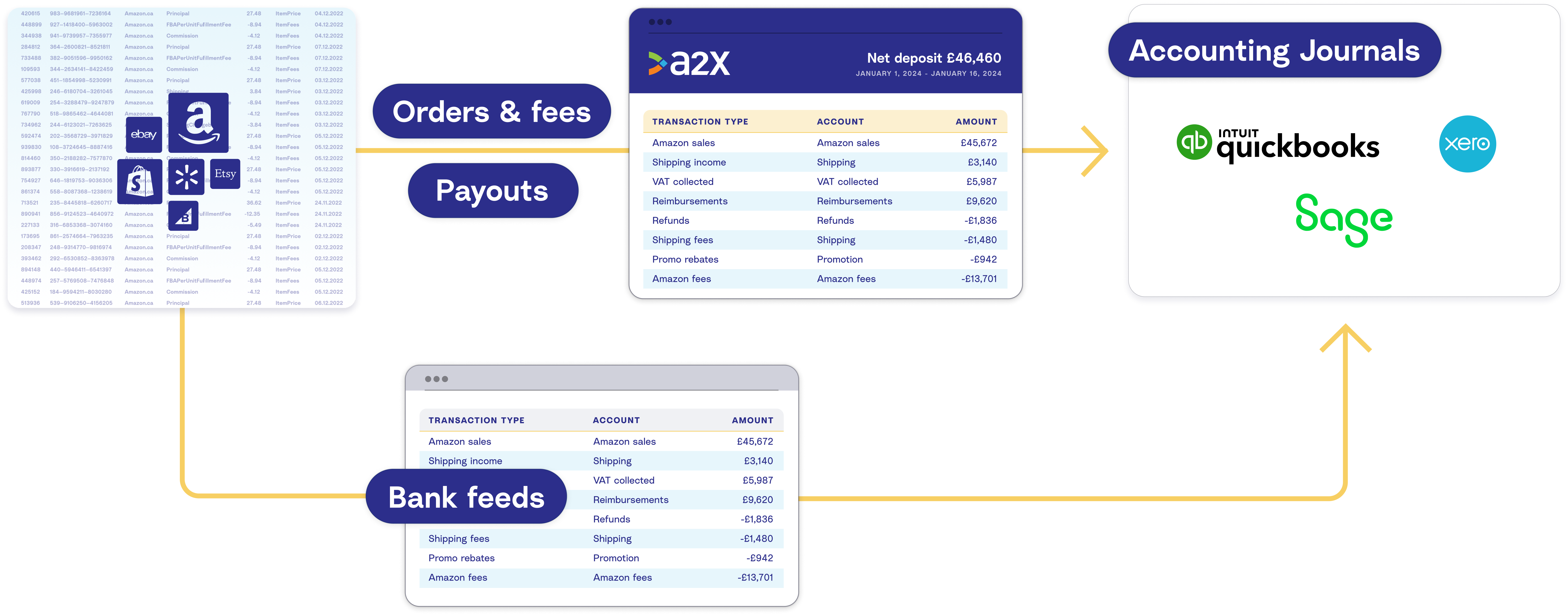
A2X can integrate Amazon with Xero, Sage, or QuickBooks Online. A2X will capture all VAT transactions, and organize your Amazon payout data into accurate summaries that reconcile perfectly with your deposits in your accounting software.
Learn more about how A2X works to make Amazon accounting easy in this video.
Selling on Amazon isn't as easy as it once was. We have navigated through increased competition, ongoing logistical complications, and advertising challenges to make it to the other side. The days of growing at all costs are behind you. You're now focused on profitable growth. But to grow profitably, you need to understand how your business is actually performing. From how much you're making, or paying in fees and shipping to what you owe in taxes, your accounting needs to be accurate, or otherwise you're flying blind.
The problem is, accurate Amazon accounting is challenging. You have settlements that span two weeks, often crossing over a month end. There are hundreds of different transaction types, including the ever-growing list of different fees. And then there's tax, which is further complicated by both where you're selling and where you're registered. Although Amazon may collect your tax under the marketplace facilitator legislation, you are still responsible for tracking and reporting your tax and correcting any differences.
Now, it might seem obvious to get all of this information from Amazon directly, but even that's not straightforward, as it's difficult to line up what you're paid with what you see in Seller Central, unless you're prepared to go through thousands of lines of data in a spreadsheet. And even then, you'd have to manually enter the transactions into your QuickBooks or Xero account. This is very manual and time-consuming, and it leaves a lot of room for error.
With all these complications and no accurate source of truth, it's no wonder why many Amazon businesses put off their accounting or just do it incorrectly. But this comes with some pretty serious risks. To get accurate financials, you need a solution that understands Amazon accounting and all of its nuances. That's why you need A2X.
A2X is an ecommerce accounting app that helps businesses, accountants and bookkeepers get accurate Amazon accounting so they have financial visibility into how their store is actually performing. So how does A2X accurately automate your Amazon accounting?
A2X connects to your Amazon Marketplace and your accounting software. Every time you receive an Amazon settlement, A2X will create a summary of your transactions and post it in QuickBooks or Xero. The summary will outline all of the transactions that made up your settlement, broken down into their appropriate categories - sales, promotions, fees, tax, shipping, warehousing, reimbursements, reserve balances. I could go on. All of the transactions will be accounted for.
If there is a settlement that covers two months, then A2X will create two entries, one for each month, and split the transactions down into the month they occurred in. The A2X summary will match perfectly with the Amazon settlement and your QuickBooks or Xero, meaning you can confidently reconcile in just one click.
With A2X, you'll save hours a month accurately accounting for every transaction on your Amazon Marketplace. You get the data you need to pay the right amount in taxes, not to mention also meaning you'll get the most out of your tax deductions, and you'll have more visibility into your numbers to make smarter decisions.
A2X is trusted by tens of thousands of ecommerce businesses around the world. It's built to scale and supports those selling on single or multiple channels in different states, countries, or even currencies. A2X supports the largest network of expert ecommerce accountants and bookkeepers. They trust A2X to help them provide their clients with accurate ecommerce accounting. If you're not working with an accountant or bookkeeper, we can't recommend our partners enough. They can help you make sense of your numbers.
Our support team is focused on your success. They understand ecommerce accounting better than most because they themselves have launched their own stores or have bookkeeping expertise. Our response time is in hours, not days. When it comes to trusting your numbers, making decisions about your business, paying tax, calculating your margins, or even valuing how much it's worth in a sale, close enough is not good enough. Set up a free trial of A2X now.
For Amazon accounting, A2X is the gold standard to automate away the headaches of data entry. Try it out at your Amazon business – set up a free trial now.
Frequently asked questions about VAT
Will VAT reduce my profit margin?
If you have set up your VAT correctly in Seller Central, then it will not reduce your profit margin, as the costs are passed on to customers.
Here are a couple of scenarios to consider:
- Your business is based in the UK, and registered for VAT. In this instance, you will charge VAT on products sold and pay VAT on all purchases. The total amount of VAT that you pay is the difference between your income and expenses.
- Your business is based in the UK, but you haven’t passed the VAT registration threshold (so you aren’t registered for VAT yet). If you are in this position, you’ll need to pay VAT on your expenses, but will not be able to charge VAT on your sales.
Either way, your profit margin should remain the same if VAT is factored into your income and expenses.
For example: You sell a product for £10, and it cost you £5.
- If you’re not registered for VAT, your income is £10 and your cost of goods sold is £5. Therefore, your profit margin is 50% (£5/£10).
- If you are registered for VAT, you’ll need to pay £1.67 (£10 - £10/1.2) in VAT, which makes your net income £8.33. However, you are also able to claim £0.83 (£5 - £5/1.2) VAT from the cost of your purchase, making your cost of goods sold £4.17. Therefore, your profit margin is 50% (£4.17/£8.33).
Does Amazon charge VAT on seller fees?
Yes, Amazon does charge VAT on seller fees. For your referral fees and monthly professional account charges, there will be an amount of VAT paid, which corresponds to the percentage rate in your country.
However, if you have provided Amazon with a VAT number (and they have verified it), you will not be charged VAT. Instead, you’ll be required to declare the expenses on your tax returns through the reverse charge mechanism.
How long do I need to keep VAT records for?
For most online sellers, you’ll need to keep your VAT records for 6 years. However, there are some circumstances where you need to hold onto records for a longer period.
If you have signed up to the MOSS (Mini One Stop Shop) system, you’ll need to hold onto VAT records for 10 years. If your business also owns land and buildings, you might need to keep VAT records for 20 years.
However, the general rule is that holding onto VAT records for 6 years is suitable. Unless they suspect fraud, the HMRC can only go back four years to issue assessments, penalties and interest.
While such a period of time might seem like forever, there is an easier way to stay on top of your books – use automation and apps to keep your records accurate and tidy as you go.
A2X is an accounting app that connects your Amazon Seller Central account with Xero, QuickBooks Online, or Sage and ensures that your income, selling fees and cost of goods sold are accurately recorded for future reference.
Can I still use A2X if I’m eligible for a special VAT scheme?
Some UK Amazon sellers are, for various reasons, registered on a different type of VAT scheme with special requirements.
For example: Some sellers are part of a Flat Rate Scheme where they do not claim relief on any of their purchases or expenses but they get to pay a reduced flat rate of VAT on all their sales.
If you are in a scheme like this, you can still use A2X. However, we recommend reviewing the setup with your accountant to make sure that it satisfies all of the requirements for your particular scheme.
What is the VAT flat rate scheme?
For UK businesses with a turnover of less than £150,000 per year, there is another way to look after your VAT returns.
In essence, you pay a flat rate of VAT on your sales (which is lower than the standard rate), but you aren’t able to claim back VAT on purchases.
Visit this page for more information about the VAT flat rate scheme.
A2X helps make accounting for VAT easy! Sign up for a free trial today.

Integrate Amazon and your accounting software for accurate accounting
A2X auto-categorizes your Amazon sales, fees, taxes, and more into accurate summaries that make reconciliation in your general ledger a breeze.
Try A2X today
ABOUT THE AUTHOR
Elspeth Cordray
Elspeth Cordray MICB PM.Dip is a Certified Bookkeeper, ecommerce specialist, and the UK Go-To-Market Manager at A2X, an award-winning ecommerce accounting automation solution. Named Bookkeeper in Industry of the Year 2024 by the Institute of Certified Bookkeepers, she knows how to help businesses …
Integrate Amazon and your accounting software for accurate accounting
A2X auto-categorizes your Amazon sales, fees, taxes, and more into accurate summaries that reconcile perfectly in your general ledger, saving you hours.